How to Build a Unified AI Stack Without the Infrastructure Headaches
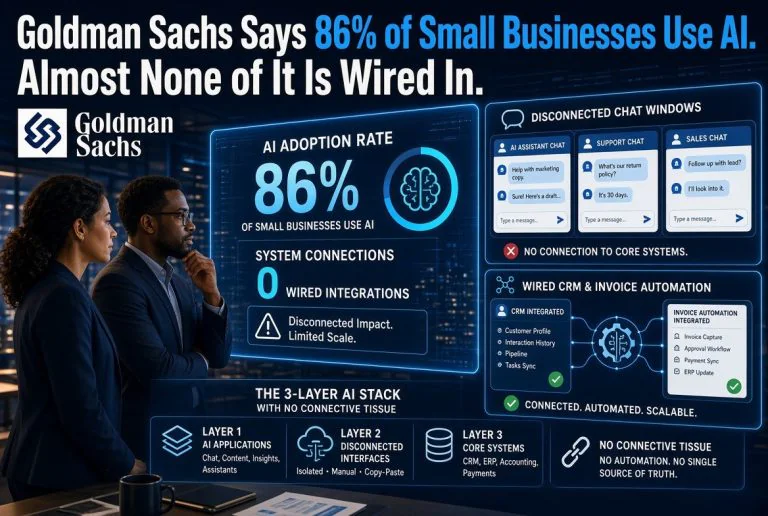
The average small business using AI runs 4.7 different tools — each with its own login, billing, API keys, and interface. That’s 4.7 separate management overheads eating into the time these tools are supposed to save. I’ve audited dozens of teams over the last year, and the pattern is consistent: more tools, less output. This article breaks down exactly how to build a unified AI stack that eliminates integration headaches, cuts costs by 40-60%, and actually makes your team more productive — not just busier with more logins.
What Is AI Tool Bloat and Why Should You Care?
AI tool bloat is what happens when your team signs up for every promising AI tool that launches. A new chat interface here, an image generator there, a video tool for marketing, a coding assistant for engineering. Before you know it, you’re managing 12 different logins, 8 separate invoices, 6 different API key rotation schedules, and zero integration between any of them.
This isn’t a hypothetical problem. I’ve watched teams spend more time managing their AI tools than actually using them to produce work. The paradox of the current AI boom is that tools designed to save you time are consuming it in a different way — through sprawl management, integration friction, and subscription overhead.
The fix isn’t to stop adopting AI tools. The fix is to adopt fewer of them with intention, and build an abstraction layer that treats every AI capability as a service rather than a destination.
How Many AI Tools Does a Small Business Actually Need?
I’ve audited dozens of small businesses and startups over the last year. Here’s what the data shows:
Most businesses need exactly 3-4 core AI capabilities:
- Conversational AI — for writing, research, brainstorming, customer support drafts
- Visual AI — for images, branding assets, social media graphics
- Process AI — for automation, workflows, data processing, repetitive tasks
- Optional: Industry-specific AI — for vertical needs like restaurant inventory or video production
Yet the average business I audit has 7+ paid AI subscriptions. The gap between 3-4 needed and 7+ paid is pure bloat. That’s $100-300/month in completely wasted subscription costs.
Here’s the hard truth: most teams don’t need a different AI tool for every task. They need one excellent generalist tool and two or three specialist tools that genuinely outperform the generalist in specific domains. Everything else is redundancy.
What’s the Best Way to Consolidate AI Tools?
Consolidation isn’t about canceling subscriptions — although you’ll do some of that too. It’s about building a stack where your tools talk to each other and you can route work to the right model without thinking about which tool it lives in.
Step 1: Audit your current toolset. List every AI tool your team has access to. Group them by capability: chat, writing, image, code, video, audio, automation, research. If you have two tools in the same category, one of them needs to go.
Step 2: Pick your hub. Every AI stack needs a central interface where work starts and ends. For most teams, this is either ChatGPT (strongest generalist, best for non-technical users) or Claude (stronger for long-form content and code, better for technical users). This hub handles 60% of your daily AI needs.
Step 3: Identify genuine specialists. Your hub handles the general case. You still need specialists for specific domains where the hub is weak. This is usually: image generation (Midjourney or DALL·E 3), video generation (Kling or Seedance), and research (Perplexity). That’s 3-4 tools total.
Step 4: Kill the overlap. If you have ChatGPT Plus, Claude Pro, Gemini Advanced, and Perplexity Pro, you’re paying $80/month for four conversation AIs. Pick one hub, retire the rest. Keep one as a backup for when your hub has an outage.
The AI Tool Sprawl Crisis: Why Small Teams Are Drowning
I spoke with a startup founder in Bangkok two weeks ago. He was proud of his “AI-forward” stack: ChatGPT for writing, Claude for code, Gemini for research, Midjourney for images, DALL·E as backup, Canva Magic Studio for design, Otter for meeting notes, Notion AI for documentation, and Zapier AI for automation. Nine tools. Nine invoices. Nine interfaces. He estimated his team spent about 40 minutes per week just managing credentials and context-switching between them.
Forty minutes per week doesn’t sound terrible. But multiply that by his team of 4 people. That’s 160 minutes per week of productivity lost to AI tool management — which is more time than they spent getting actual work done out of any single AI tool. The tools were costing them more attention than they were saving.
This is the AI tool bloat crisis in a nutshell. The tools are individually useful, but collectively they create a management overhead that erases much of their value.
How Do I Know if I Have Too Many AI Tools?
Here’s my simple diagnostic. If you answer “yes” to any three of these questions, you have AI tool bloat:
- Do you have more than one subscription for the same capability (e.g., two chat AIs, two image generators)?
- Does your team use fewer than half of the AI tools you’re paying for in a given week?
- Do you have AI tools that only one person on your team knows how to use effectively?
- Do you have AI tools you subscribed to months ago and haven’t opened recently?
- Do you find yourself copying output from one AI tool to paste into another because they don’t integrate?
- Are you managing API keys or access tokens for more than 3 AI tools?
- Do you feel like you spend more time managing AI tools than using them?
If you’re at three or more, it’s time to consolidate.
Building Your AI Stack: Three Tiers for Different Team Sizes
The right stack depends on your team size and technical sophistication. Here are the three tiers I recommend:
Tier 1: Solo Operator or Micro-Business (1-2 people, $40-60/month)
Hub: ChatGPT Plus ($20/month). It handles writing, brainstorming, research, basic image analysis, and most day-to-day tasks. If you’re a developer, swap to Claude Pro ($20/month) for better code and long-form output.
Specialist: Canva Pro ($13/month) for visual content. The AI features (Magic Studio, background removal, style templates) cover 90% of visual needs for a solo operator.
Extra: One free tool — Perplexity (free tier) for research, or Suno (free tier) for audio if it’s relevant.
Total stack: 2-3 tools. Total cost: $33-60/month. Coverage: 90%+ of AI needs.
Tier 2: Small Team (3-10 people, $120-200/month)
Hub: ChatGPT Team ($25/person/month) or Claude Team ($30/person/month). Same logic — pick one and standardize everyone on it. The team workspace features are worth it.
Specialist 1: Midjourney or DALL·E 3 for image generation ($10-20/month). Pick one, don’t double up.
Specialist 2: Perplexity Pro ($20/month) for research and real-time data. Shared account across the team.
Specialist 3: Make or Zapier for process automation ($20-40/month). This is where most teams underinvest — automation orchestration is the highest-ROI AI spend.
Total stack: 4 tools. Total cost: $120-200/month. Coverage: 95%+ of AI needs.
Tier 3: Growing Business (10-50 people, $400-800/month)
Hub: ChatGPT Enterprise or Claude Enterprise ($50-60/person/month). Centralized management, SSO, data privacy, usage analytics.
Specialist 1: Midjourney + one video tool (Kling or Seedance) for content production ($20-50/month).
Specialist 2: Perplexity Pro for team research ($20/month).
Specialist 3: Make or n8n (self-hosted) for complex automation workflows.
Specialist 4: Custom RAG (Retrieval-Augmented Generation) on your own data — using something like Supabase plus OpenAI embeddings or a purpose-built tool like Glean. This is the layer that most scaling businesses skip and it’s the one that delivers the most value.
Total stack: 5-6 tools. Total cost: $400-800/month. Coverage: 98%+ of AI needs.
The AI Infra Abstraction Layer: What It Means and Why It Matters
The concept that changed how I think about this is the “AI infra abstraction layer.” It’s a fancy term for a simple idea: separate the interface your team uses from the AI models running behind it.
Right now, most teams think of ChatGPT as a destination. You open ChatGPT.com to talk to GPT-4. You open Midjourney on Discord to make images. You open Perplexity to search. Each tool is its own island, with its own login, billing, and context.
The abstraction layer approach flips this. You pick one primary interface — usually a chat app or an API gateway — and route requests to whatever model is best for the job. Your team doesn’t need to know whether they’re talking to GPT-4, Claude, or Gemini. They just ask, and the routing layer sends their request to the right model.
This is how large companies use AI. They don’t have 12 logins. They have one API gateway, one access management system, and one billing pipeline. The models underneath change and improve, but the team’s workflow doesn’t.
For small businesses, you can achieve a simplified version of this with tools like TypingMind (a unified chat interface that supports multiple model providers) or OpenRouter (a single API key that routes to any model). For $10-20/month, you get the abstraction layer without building it yourself.
How to Evaluate Whether a New AI Tool Deserves a Spot in Your Stack
I use a simple four-question framework before adding any new AI tool:
- Does it do something my existing stack cannot? If yes, proceed. If no, reject.
- Does it do it 2x better than my existing stack? Not 50% better. 2x. The switching cost and context overhead are real. A marginal improvement isn’t worth the fragmentation.
- Does it integrate with my hub? Can I access it from the same interface I use for everything else? If it requires learning a completely new interface, the adoption friction will kill it within weeks.
- Am I willing to cancel an existing tool to stay within 3-4 tools total? If you can’t name which tool you’d drop to make room, you don’t need the new one.
If a tool doesn’t pass all four questions, don’t buy it. Wait. Most AI tools that launch today won’t exist in their current form in 12 months anyway.
Common Mistakes That Keep Your AI Stack Fragmented
I’ve seen the same mistakes across dozens of teams. Here are the most expensive ones:
Mistake 1: Buying every new tool that launches. The AI hype cycle feeds on FOMO. Every week there’s a new “AI-powered X” that promises to change everything. Most of them won’t exist in two years. Let early adopters validate them before you add them to your stack.
Mistake 2: Not checking integrations. A tool that doesn’t connect with your existing ecosystem creates data silos. If your AI writing tool can’t push to your CMS, and your AI image tool can’t pull from your brand asset library, you’re creating more work than you’re saving. Always check: does this tool have an API? Does it connect to my hub? Can I export my data easily?
Mistake 3: Ignoring API limits. A tool that’s fast and cheap at 100 calls/day becomes slow and expensive at 1,000 calls/day. Check the rate limits and pricing tiers before you build a habit around a tool that can’t scale.
Mistake 4: Letting every team member pick their own tools. This is the fastest path to an unmanageable stack. When each person on a 5-person team has their own preferred AI tools, you end up with 8-10 different subscriptions — and zero standardization. Have one person own the AI stack decisions for the whole team.
Mistake 5: Ignoring the abstraction layer. The biggest teams I’ve worked with all converged on the same realization: the interface should be separate from the models. Your team should have one place to go for AI help. Everything else is a backend detail.
Which Tools Overlap and Can Be Eliminated?
Here are the most common redundancies I find in small business AI stacks, and my recommendations for eliminating them:
- Two chat AIs (e.g., ChatGPT plus Claude plus Gemini): Keep one, keep one as a free-tier backup, cancel the third. Pick ChatGPT if you’re non-technical, Claude if you’re a developer.
- Two image generators (e.g., Midjourney plus DALL-E plus Firefly): Keep Midjourney for high-quality output, keep DALL-E’s free tier for quick prototypes. Cancel the rest.
- Two meeting note-takers (e.g., Otter plus Fireflies): Pick one. They’re nearly identical in functionality. Cancel the other.
- Overlapping automation tools (e.g., Zapier plus Make plus n8n): Pick one platform and standardize. Make offers the best price-to-value ratio for most SMBs. Zapier has the largest integration library. n8n is best if you have technical talent.
- Multiple writing assistants (e.g., ChatGPT plus Jasper plus Copy.ai plus Rytr): This one kills me. So many businesses pay for dedicated writing AIs when ChatGPT or Claude handles those tasks perfectly well. Cancel all the specialists and use your hub for writing.
If you eliminate all the redundancies, most small businesses save $100-200/month immediately.
Frequently Asked Questions
What is AI tool bloat?
AI tool bloat is the accumulation of redundant or overlapping AI subscriptions within a team or organization. It typically results in higher costs, fragmented workflows, and reduced productivity as teams spend more time managing tools than using them.
How many AI tools does a small business need?
Most small businesses need 3-4 core AI capabilities: conversational AI (one tool), visual AI (one tool), process automation (one tool), and optionally one industry-specific tool. That’s 3-4 total — not three to four of each category.
What’s the best way to consolidate AI tools?
Audit your current subscriptions by capability. Eliminate duplicates. Pick one hub tool that handles 60% of your needs. Keep 2-3 genuine specialists. Standardize your team on the same stack. Implement an abstraction layer so the team interfaces with one system, not multiple.
How do I know if I have too many AI tools?
If you’re paying for more than one tool in the same category, if your team doesn’t use half of what you’re paying for weekly, or if you spend more time managing tool credentials than getting work done, you have bloat.
What is the AI infra abstraction layer?
An abstraction layer separates the user interface from the underlying AI models. Instead of logging into different tools for different models, your team uses one interface and the system routes requests to the best model for each task. This reduces fragmentation and future-proofs your stack as models improve.
Barak Schurr built and sold a major ticketing platform, ran global nightlife operations at Eventbrite, and now spends his time figuring out which AI tools actually move the needle for independent business owners — and which ones are just noise. No hype. No fluff. Just what works.
Contact him at [email protected]
More AI Resources for Your Business