

Every.ai Review 2026: An AI CRM and Billing Stack Built for Solo Service Pros
⚡ Expert Summary: Every.ai is an AI-native client platform that pulls the scattered tools of a solo service business — CRM, pipeline, proposals, invoicing, online payments, time tracking, expenses, and client portals — into one workspace with a conversational agent that drafts and routes the busywork. For a freelancer, consultant, or tiny agency juggling 5-10 separate subscriptions, the pitch is simple: one workspace, one AI assistant, one billing flow instead of a pile of disconnected tools. It starts at $15/month on annual billing. This review breaks down what it does, what it costs, and whether it actually replaces your stack.
If you run a service business on your own — consultant, freelancer, coach, small studio — you have likely assembled the same accidental tech stack as every other solo operator in America. A CRM here, a proposal tool there, an invoicing app, a payment processor, a time tracker, a client portal. Each one is fine on its own. Together they create the real job no one talks about: re-typing the same client, project, and dollar figures into six different places and hoping nothing drifts out of sync.
Every.ai is built to attack that specific problem. It is an AI-native client operations platform designed for freelancers, consultants, creators, and service businesses that want to stop gluing tools together. Rather than answer questions and stop, its built-in Every Agent actually does the administrative work — drafting a proposal, building an invoice, chasing a late payment, or scoring a new lead — inside one place where the data already lives. This review walks through the full feature set, the honest pricing, the real trade-offs, and how it compares to doing it the old way.
What Every.ai Actually Does
At its core, Every.ai collapses the client-lifecycle toolkit into a single workspace. Instead of running a separate CRM, a proposal generator, and an invoicing app, you run one platform where a lead becomes a proposal becomes an invoice with the context carried forward automatically. For a solo professional, that continuity is the whole game — it is what removes the manual re-entry that burns hours.
Every.ai is deliberately not trying to be everything. It is not a full bookkeeping or tax general ledger, it is not an e-signature contract tool, and it is not a heavyweight enterprise CRM. Its lane is the relationship-and-billing workload of a service business that gets paid for its expertise, not box-shifting millions of SKUs. Understanding that boundary is the difference between choosing it happily and expecting it to do a job it never claimed to do.
The Every Agent: Conversational AI That Does Work, Not Just Answers
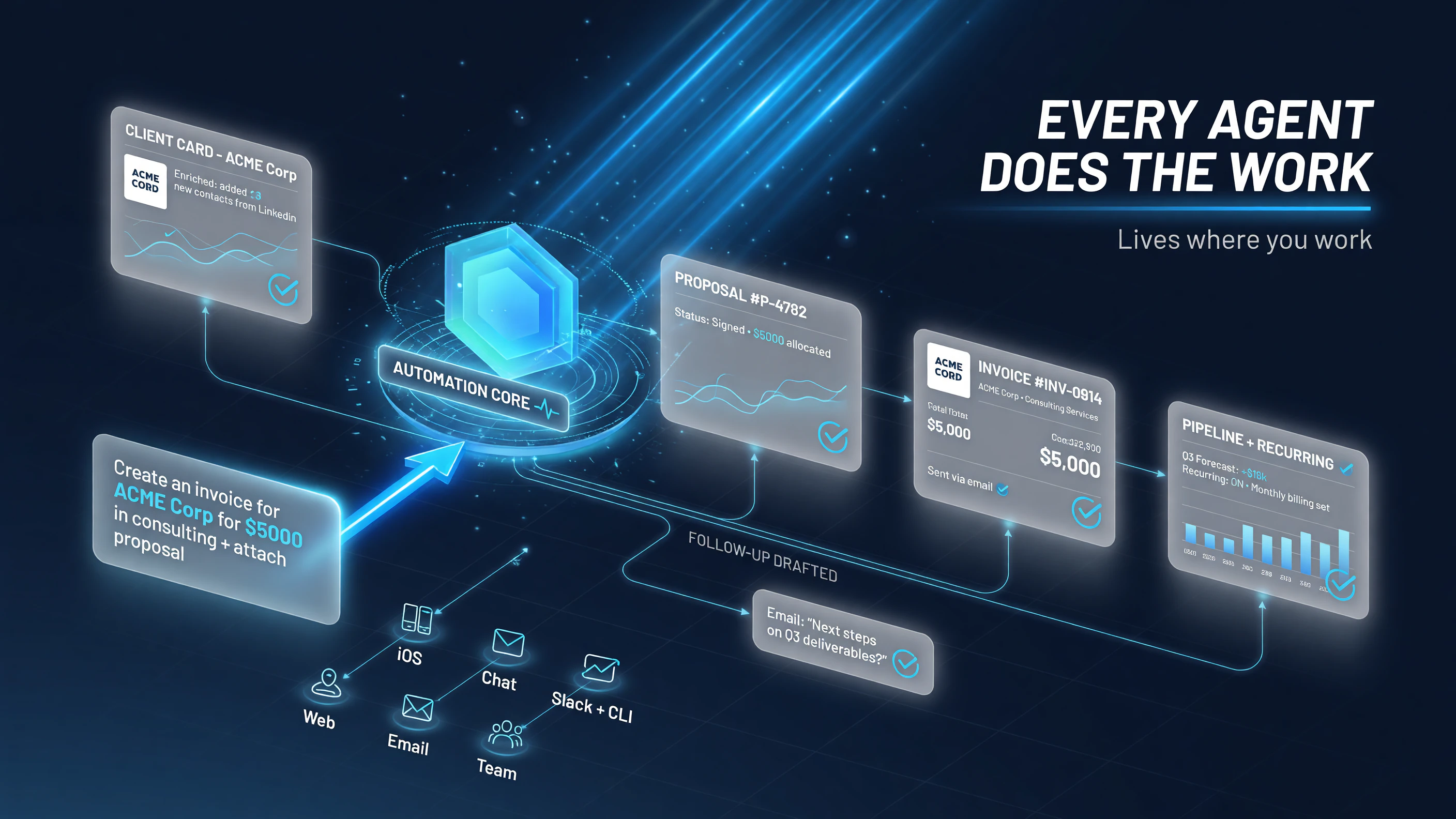
The difference between a chatbot and the Every Agent: a request like “create an invoice for ACME Corp for $5,000” lands as a real, branded invoice pulled from your existing client context – the agent lives where you work, across the web app, iOS, email, and chat.
The differentiator is the Every Agent, an AI assistant woven through the whole workspace. It is not bolted on as a chat widget that gives advice and stops. It reads and writes your actual records — clients, proposals, invoices, pipeline — so you can say something like “create an invoice for ACME Corp for $5,000 in consulting” and have it produce a proper, branded invoice from your existing client context rather than a blank template you fill yourself.
Because it has access to your real business data, the agent can do genuinely useful things: prospect for warm leads in your network, enrich a client record with web and LinkedIn data, draft follow-up outreach, analyze your pipeline and finances, set up recurring billing, and run scheduled automations. You can reach it through the web app, the iOS app, email, or chat, and the Team plan adds Slack and CLI access. The practical effect is that the assistant lives where you actually work, not in a separate tab you forget to open.
Proposals That Convert Straight Into Invoices
One of the strongest workflow decisions in Every.ai is how it connects winning work to getting paid. You build a branded, collaborative proposal with AI drafting help, load in your services and pricing, and when the client approves, the proposal converts directly into an invoice. The dollar figure, the line items, and the client context all carry over — you do not rebuild the invoice from scratch.
That connection solves a real leak in solo businesses: work gets scoped and pitched, but the billing setup is a separate chore that can slip, especially for owners who dread admin. When the approved SOW becomes an invoice in one step, the money workflow closes the loop instead of leaving it to your discipline after a long week of client calls.
Invoicing, Payments, and Chasing Late Money
On the billing side, Every.ai produces professional, branded invoices with line items pulled from your time tracking, expenses, services, or products. Clients pay through Stripe online or via manual methods, and you get tracking, reminders, recurring billing, and client-visible status pages that tell you whether an invoice was seen and whether it is outstanding.
For a solo professional, the late-payment problem is where the time-cost really bites. Every.ai’s AI can draft the follow-up reminder and reference the actual open balance, which removes the awkwardness of chasing money and speeds up collection. When you are the whole accounts-receivable department, a tool that makes the reminder easy is worth real money on its own.
CRM, Prospecting, and Pipeline
Under the hood there is a real CRM with client and company records, AI enrichment pulled from your web, Gmail, Google Contacts, and LinkedIn, support for multiple contacts per client, and pipeline views to track deals. The agent can help surface warm leads from your network and score fit, which is a meaningful upgrade over cold-list shout-into-the-void prospecting for a small operator whose best opportunities are usually one connection away.
Every.ai is not a churn-and-burn outbound machine. Its prospecting leans on warm-network signals and relationship context, which fits how most consultants and agencies actually win work. It scores and surfaces the people already in your orbit rather than pretending to cold-email strangers into clients.
Time Tracking, Expenses, and Client Portals
The support features round out the lifecycle. Live timers turn tracked hours directly into invoice lines, AI receipt scanning surfaces expenses, and you can bill client expenses back instead of eating them. Every client gets a branded portal on your own subdomain where they can review proposals and invoices — a small touch that makes a solo operator look like an organized firm.
Every.ai supports USD and CAD, connects to Google Workspace, Stripe, and HubSpot (among others like Slack and Airtable), and lets you teach the agent your business context — your services, pricing, voice, and rules — so its drafts sound like you instead of a generic chatbot.
Every.ai Pricing: What It Really Costs
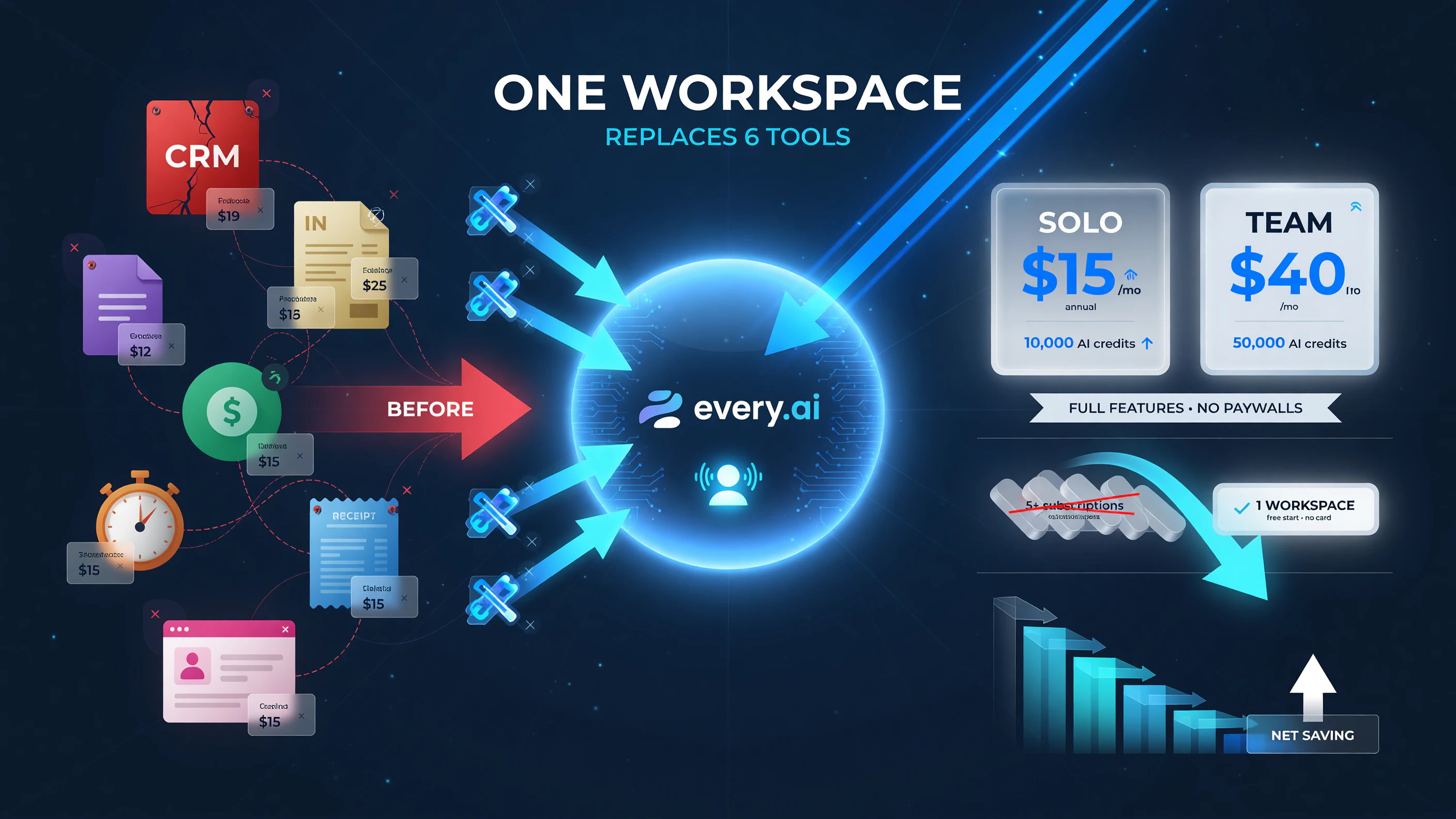
The pitch behind the price: what used to cost several subscriptions can fold into one workspace at $15/month on the Solo plan, with the full feature set open on every tier rather than gated behind the top plan.
Every.ai structures plans around AI credits that power the agent, and every plan includes the full core feature set — there are no paywalled feature tiers. That is refreshingly simple compared to tools that gate invoicing behind the top plan. Here is how the public pricing shakes out.
| Plan | Price (annual) | Monthly AI Credits | Best For |
|---|---|---|---|
| Solo | $15/month | 10,000 | Freelancers and entrepreneurs working alone |
| Team | $40/month | 50,000 | Teams of up to 5 sharing context and deals |
| Custom | Contact sales | Tailored | Larger teams needing unlimited members and setup |
Every.ai offers a free start with initial credits and no credit card, which is a low-friction way to test whether the agent actually saves you time before committing. Credits reset monthly and deplete with agent usage; you can buy extra non-expiring credits if you burn through your allocation. For a solo operator comparing against, say, the combined cost of a separate CRM plus invoicing app, the $15/month number is often a net saving before you even count the hours saved.
Every.ai vs the Old Way: Side by Side
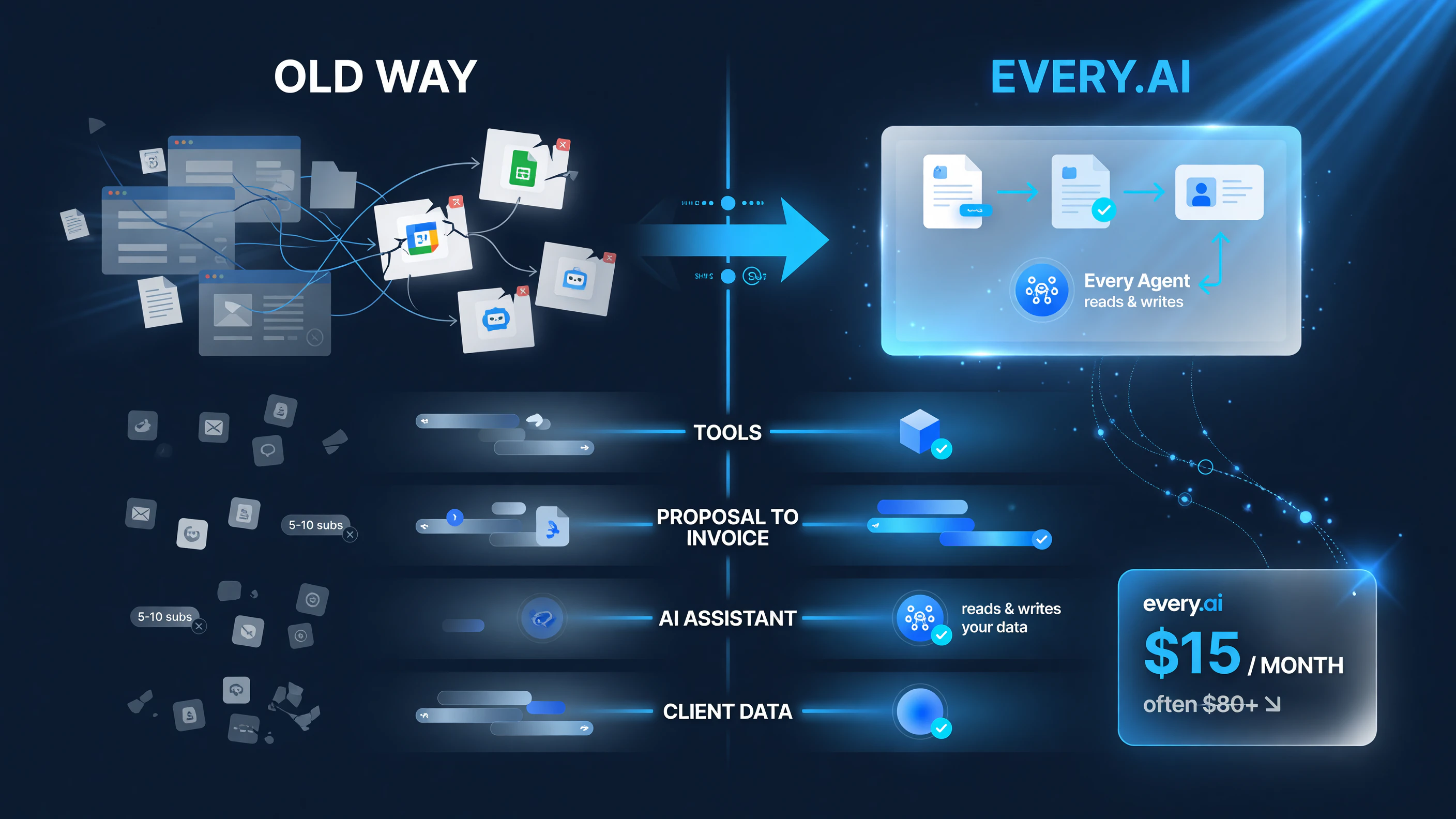
Where the saving shows up: roughly the same work that needed 5-10 separate subscriptions and manual re-entry between them folds into one workspace, with proposals converting to invoices automatically and the entry cost at $15/month.
The clearest way to judge Every.ai is to stack it against the piecemeal approach most solo pros have today. The table below compares managing clients the old way — separate CRM, proposal tool, invoicing app, and payments — against doing it all inside Every.ai.
| Factor | The Old Piecemeal Stack | Every.ai |
|---|---|---|
| Tools needed | 5-10 separate subscriptions | One workspace |
| Proposal to invoice | Manual re-entry between apps | Converts automatically |
| AI assistant | None or separate chatbot | Every Agent reads and writes your data |
| Client data continuity | Fragmented across apps | One shared context |
| Monthly cost (entry) | Often higher when summed | $15/month |
The honest trade-off: a purpose-built specialist tool will almost always beat Every.ai at its single specialty. If your entire world is complex enterprise contract e-signing, or you need a deep accounting general ledger, Every.ai is the wrong tool. But for a solo service professional whose bottleneck is not a single task but the friction of moving work through a pipeline, the integration is the feature. Fewer tools and shared context routinely save more hours than any single best-in-class app.
Who Should Use Every.ai
The clearest fits are freelancers, consultants, coaches, and small agencies that sell their expertise, invoice their clients, and want to stop re-entering the same data across apps. If you live in proposals and invoices, if your best leads come from your own network, and if you are currently paying for several tools that do not talk to each other, this is the audience Every.ai serves best.
The tool is a poorer fit if you are a product business needing inventory and a full ledger, or if you need heavyweight enterprise CRM with complex territory and role hierarchies. And solo operators who barely touch their pipeline — say an owner whose invoicing fits on one screen a week — should trial the free tier first and only commit when the agent demonstrably saves time.
Every.ai vs its AI Competitors
Every.ai is not alone in bringing an AI assistant into client operations. It sits in a growing category alongside lightweight CRM-and-billing tools that are bolting on chat. The difference is architectural: Every.ai built the agent into a workspace where it can act on your records, whereas many competitors treat AI as a thin overlay on a traditional database.
For a solo pro, that distinction shows up as trust. When an agent can draft an invoice referencing your real open balance, convert an approved proposal, and chase a late payment using your actual client relationship — that is materially more useful than a chat widget that only offers generic advice. Treat generative depth as the deciding factor, not feature-count marketing.
Getting Started With Every.ai
If the fit sounds right, the path is low-risk. Start on the free tier, connect the tools you actually use, teach the agent your business context, and run one real workflow — say, turning an approved proposal into the invoice — before you commit to a paid plan. That single test will tell you in minutes whether the integration saves you the hours it promises.
- Start free. No credit card needed to test the core workspace and agent.
- Connect your stack. Link Google Workspace, Stripe, or HubSpot so the agent has real context.
- Set business context. Tell it your services, pricing, and voice so drafts sound like you.
- Run one real workflow. Convert an approved proposal into an invoice and send it.
- Upgrade for volume. Move to Solo or Team once you confirm the credits and features match your monthly workload.
FAQ: Every.ai for Solo Service Businesses
How much does Every.ai cost?
The Solo plan is $15/month on annual billing and includes 10,000 monthly AI credits. The Team plan (up to 5 users) is $40/month on annual billing with 50,000 credits. Every.ai starts free with initial credits and no credit card required.
Is Every.ai a CRM or an invoicing tool?
Both. It is an AI-native client operations platform that combines CRM, pipeline, proposals, invoicing, payments, time tracking, expenses, and client portals in one workspace. It is not a full accounting general ledger or an e-signature contract tool.
Can Every.ai’s AI agent actually do tasks?
Yes. The Every Agent reads and writes your real records, so it can draft branded proposals and invoices from existing context, chase late payments, score leads, enrich client records, and run scheduled automations.
Is Every.ai good for freelancers and consultants?
Yes. It is built specifically for solo service professionals, freelancers, consultants, and small agencies that sell expertise, invoice clients, and want to collapse multiple tools into one workspace starting at $15/month.
Does Every.ai replace other business tools?
It replaces the CRM, proposal, invoicing, payment, time-tracking, and client-portal layer for service businesses. It does not replace specialized tools for full bookkeeping, complex contract e-signing, or enterprise-scale CRM requirements.

About Barak Schurr
Barak Schurr built and sold a major ticketing platform, ran global nightlife operations at Eventbrite, and now spends his time figuring out which AI tools actually move the needle for independent business owners — and which ones are just noise. No hype. No fluff. Just what works.
Email: [email protected]
More AI Resources for Your Business