

How to Cut Your AI Tool Spend by 50% in 2026 (Complete Guide)
⚡ Expert Summary: The average small business now runs somewhere between nine and fifteen separate AI subscriptions, and most operators cannot name what they pay each month without opening a credit card statement. That is the leak. By consolidating overlapping tools, cancelling the ones that duplicate a feature you already own, switching from monthly to annual billing, and moving low-volume work onto a single general-purpose assistant, most operators cut their AI tool spend by 45% to 55% without losing a single capability they actually use. For a business spending $600 a month across AI tools, that is roughly $3,600 back in the first year — for about two hours of work.
Here is the uncomfortable truth about the AI gold rush: the tools are not expensive individually. They are expensive collectively. Eleven dollars here, twenty-nine there, a forty-nine dollar plan you signed up for in a slow week and forgot about. Nobody audits it because each charge is small enough to slip past. But add them up at the end of a year and most small business owners find a number between $5,000 and $12,000 — spent on software where a third of the seats are empty and half the features overlap with something else they already pay for.
This guide is the audit. Seven steps, in order, that reveal exactly where your AI spend is going and how to cut it roughly in half. Every step is something you can do today with the tools you already have.
Step 1: Find Out What You Are Actually Paying For
You cannot cut what you cannot see. The first step takes twenty minutes and it is the one most operators skip.
Open your business card statement or accounting software and search for every recurring software charge for the last three months. Include the annual ones — those hide best because they only sting once. Put every line into a single spreadsheet with four columns: tool name, amount, billing cycle, and the name of the person who signed up for it.
Expect two surprises. First, the total. Second, at least two subscriptions where the “signed up by” column is blank because nobody remembers. In our work with small operators, the recurring discovery is a tool that was trialled for a single project eight months ago and has been billing monthly ever since.
Quick win: If a tool has not been opened in thirty days and no one can name what it does, cancel it today. Not at renewal — today. Most of these are month-to-month and you are not locked in.
Step 2: Map Every Tool to an Actual Job
Now take the surviving list and write down, in plain language, the single job each tool does for your business. Not the category it belongs to — the actual recurring task.
This is where the overlap becomes obvious. A typical small business audit looks like this:
- Three tools that all write marketing copy
- Two tools that both summarize meetings
- Two image generators, one of which you have not opened since March
- A “research assistant” and a general AI chatbot that do the same thing at different prices
- A document AI that duplicates a feature built into the general assistant you already pay for
When you write the jobs down side by side, the duplication is impossible to miss. Two tools, one job means one of them is waste.

Four leaks, one budget: duplicate tools, unused seats, overage fees and forgotten subscriptions quietly drain about $4,200 a year from a typical small business AI stack.
Step 3: Consolidate Three Jobs Onto One General Assistant
This is the single largest saving available to most small businesses, and it is the step operators resist most because it feels like a downgrade.
General-purpose AI assistants — the kind that write, summarize, analyze, draft emails, build spreadsheets, and answer questions in one subscription — have closed most of the quality gap with the specialised tools they used to lose to. For low-to-medium volume work, a single general subscription at $20 to $30 a month can replace three or four niche tools that cost $15 to $30 each.
The rule of thumb: if a specialised tool’s job can be done to 85% quality inside your general assistant and you use that job less than several times a day, you are paying a premium for the last 15%. For most small businesses, that premium is not worth the money.
The exception is genuine volume. If you are generating hundreds of product images a month or processing thousands of support tickets, a specialised tool earns its fee. Below that threshold, consolidation wins.
Quick win: Pick your three most-overlapping tools. Cancel two. Move their work into the general assistant for thirty days. If you do not miss them in a month, you were never using them properly.
Step 4: Downgrade the Seats You Are Not Using
Per-seat pricing is where AI spend quietly doubles. Most tools charge per user, and most small businesses are paying for seats that were added during a busy period and never removed.
Pull the admin panel for every tool with seat-based pricing and check two things: how many seats you are paying for, and how many people logged in during the last thirty days. The gap is your saving. Staff leave, roles change, contractors finish projects — the seat stays.
Also check your tier. Many small businesses sit on a “Team” or “Business” plan they were upsold into during onboarding. If your usage sits comfortably inside the limits of the tier below, downgrade. You can move back up any time, and the downgrade is usually instant.
Consolidation Math: What One General Assistant Replaces
| Function | Specialised Tool Route (Monthly) | Consolidated Route (Monthly) |
|---|---|---|
| Writing and marketing copy | $29 dedicated copywriting AI | Included in general assistant |
| Meeting and document summarization | $18 meeting notetaker | Included in general assistant |
| Basic image generation | $20 image generator | Included at lower volume |
| Research and analysis | $20 research AI | Included in general assistant |
| Spreadsheet and data cleanup | $15 data AI add-on | Included in general assistant |
| Document drafting and review | $25 document AI | Included in general assistant |
| Total | $127/month | $25-30/month |
That is a 75% reduction on the tools in this example, achieved by making one decision instead of six. Your own mix will differ, but the pattern holds: the more niche tools you stack, the more you are paying for capability that already exists in the subscription you open every morning.
Step 5: Switch Monthly Billing to Annual — Selectively
Almost every AI vendor offers a discount for annual prepayment, typically 15% to 20%, and some run closer to 25% on annual commitments. On a $250 monthly bill, a 17% saving is $510 a year for doing nothing but changing a billing toggle.
The trick is doing it selectively. Annual billing is only a saving if you are certain you will keep the tool. Prepaying for twelve months on a tool you cancel in month three is not a discount — it is a loss.
The rule: put a tool on annual billing only after it has survived at least one full quarter of regular use. Tools that pass that test typically stay. Tools that fail it should never be prepaid.
Quick win: Also check for the retention offer. When you initiate a cancellation, a meaningful minority of AI vendors will offer a discount or a free month to keep you. It costs you thirty seconds to find out.
Step 6: Kill the Auto-Renewals You Forgot About
Annual subscriptions renew silently. You get an email that looks like a receipt, and the charge lands. Twelve months later you are paying for something the business outgrew ten months ago.
Set a calendar reminder two weeks before every annual renewal date with a single question attached: Are we still using this? Two weeks is enough lead time to cancel cleanly or negotiate a better rate. Doing this across an entire tool stack typically finds at least one dead subscription every year — often a $200 to $500 one.
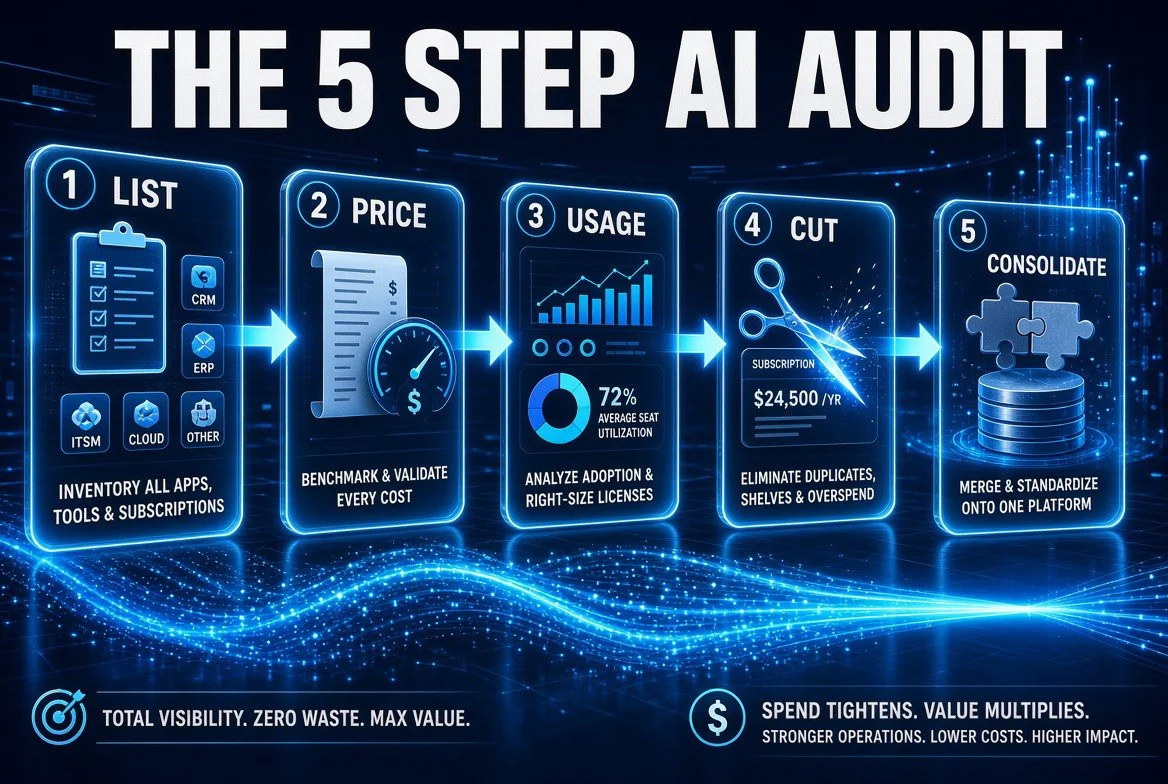
The audit itself is five steps — list every tool, price it, check real usage, cut what fails, then consolidate what is left. Run it once and it takes an afternoon.
Step 7: Set a Quarterly Review So It Does Not Creep Back
AI spend does not stay cut on its own. New tools get trialled, free trials convert automatically, someone adds a seat during a rush week. Without a review, the stack rebuilds itself inside eight months.
Put a ninety-minute block in the calendar once a quarter and run the same audit: list every recurring charge, name the job each tool does, check seat usage, and cancel anything that fails the test. The second time through takes about forty minutes because your spreadsheet is already built.
What to Keep: When a Specialised Tool Is Worth the Money
Cutting spend is not the same as cutting capability, and this guide would be useless if it pushed you to cancel tools you genuinely need. Three conditions justify a specialised subscription:
Volume. If you run hundreds of the same task a month, a specialised tool built for that task will outrun a general assistant on speed, consistency, and integration. Volume is the strongest case for a dedicated tool.
Workflow integration. If a tool plugs directly into the system where the work already happens — your CRM, your accounting platform, your help desk — the integration itself often justifies the cost. Removing it means adding manual steps that cost more in labour than the subscription.
Compliance and accuracy. In fields where errors carry real cost — bookkeeping, legal drafting, medical-adjacent work — a tool with domain-specific checks and audit trails is worth paying for. Do not consolidate away your safety net.
Everything else is a candidate for consolidation. That is most of what the average small business is paying for.
If you want a sense of how much capability has moved into general assistants and cheap specialists this year, our guide to running a one-person AI back-office shows how far a small number of well-chosen tools can stretch before you need another subscription.
Before and After: What the Audit Actually Changes
| Factor | Before the Audit | After the Audit |
|---|---|---|
| Active AI subscriptions | 9-15, no single owner | 4-6, each mapped to a named job |
| Monthly spend (typical SMB) | $400-$900 | $180-$400 |
| Overlapping tools | Unknown, never checked | Identified and consolidated |
| Unused seats | Paid for, not logged in | Removed or reassigned |
| Billing cycle | Monthly on everything by default | Annual on proven tools only |
| Renewal visibility | Charges appear as a surprise | Two-week reminder before every renewal |
| Who owns the stack | Nobody | One named owner, quarterly review |
The bottom row is the one that determines whether your savings survive. Every audit that fails does so for the same reason: nobody owns the stack. Assign one person, give them the spreadsheet, and put the quarterly review in their calendar. That single accountability step is worth more than any individual cancellation.
Common Mistakes That Waste the Whole Exercise
Cancelling the thing the business actually runs on. Before you cancel anything with a workflow integration, check what breaks. A tool that quietly feeds data into your invoicing is not a saving when you turn it off — it is an outage.
Consolidating the high-volume work. Moving your highest-volume task onto a general assistant to save $20 usually backfires in quality and time. Consolidate the low-volume, low-frequency tools first.
Doing it once and never again. An audit is a practice, not a project. Without the quarterly review, spend returns to its old level within a year.
Optimising the subscription and ignoring the usage. The $29 tool you use daily beats the $8 tool you never open. Cost per task performed is the number that matters, not the sticker price.

What it looks like on the other side: $740 a month across 11 tools becomes $370 across 6 — the same work, half the bill.
Frequently Asked Questions (FAQ)
How much can a small business realistically save on AI tools?
Most small businesses we audit find 45% to 55% of their AI spend is recoverable through consolidation, removing unused seats, and switching proven tools to annual billing. The largest single saving almost always comes from replacing three or four low-volume specialised tools with one general-purpose assistant.
Will consolidating onto one AI assistant hurt quality?
Not for low-to-medium volume work, where general assistants now match specialised tools closely enough that the difference is invisible in the output. Quality suffers only when you consolidate genuinely high-volume or workflow-critical work, which is exactly the work you should keep on a dedicated tool.
Is annual billing always cheaper?
It is cheaper per month, but only a saving if you keep the tool for the full year. Put a subscription on annual billing only after it has survived at least a full quarter of regular use. Prepaying for a tool you cancel in month three costs more, not less.
What should I do first if I only have thirty minutes?
Pull three months of card statements and list every recurring software charge into one spreadsheet. That single exercise usually reveals two to four tools nobody remembers signing up for, and cancelling those is immediate money without any analysis required.
How often should I review AI subscriptions?
Quarterly. The first audit takes about ninety minutes; subsequent ones take around forty because the spreadsheet already exists. Without a quarterly review, new trials and added seats rebuild your spend to its old level within about eight months.
Should I cancel a tool that integrates with my other systems?
Not without checking what depends on it. Tools that feed data into your CRM, accounting platform, or help desk often justify their cost through integration alone. Replacing them means adding manual work that usually costs more in labour than the subscription did.
Pricing ranges and consolidation savings in this guide reflect typical US small business AI tool stacks observed in 2026. Your numbers will differ — the audit in Step 1 gives you the real figures for your business, which is the only baseline worth optimising against.

About Barak Schurr
Barak Schurr built and sold a major ticketing platform, ran global nightlife operations at Eventbrite, and now spends his time figuring out which AI tools actually move the needle for independent business owners — and which ones are just noise. No hype. No fluff. Just what works.
Email: [email protected]
More AI Tools Resources