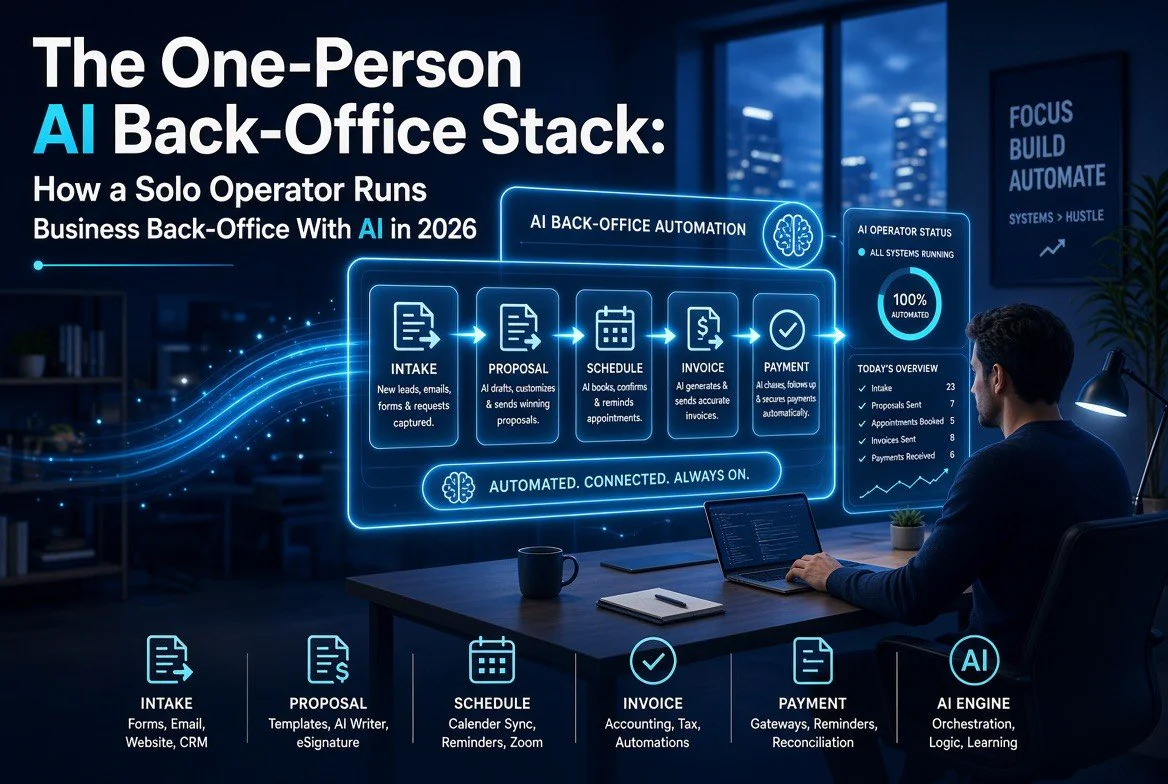
The One-Person AI Back-Office Stack: How a Solo Operator Runs Business Back-Office With AI in 2026
\n\n
⚡ Expert Summary: A solo operator can run a complete business back-office — client intake, proposals, scheduling, invoicing, payment chasing, and bookkeeping — with an AI stack that costs between $60 and $120 a month and replaces the need for part-time admin help. The method is not to buy more tools; it is to assemble one orchestrated system: an AI drafting assistant for proposals and emails, an automation layer that connects them, an AI invoicing tool that chases late payers, and an AI scheduler that protects your focus time. Follow the five-step build below and you can reclaim 10 to 20 hours a week.
\n
\n\n
The back-office is what kills a one-person business. Not the selling, not the delivering — the invisible pile of invoices that need writing, appointments that need scheduling, proposals that need sending, and overdue payments that need chasing. When you are the whole company, every hour on admin is an hour you are not doing the work you actually get paid for.
\n\n
The good news for 2026: the tools that automate this are no longer clunky business software that takes a weekend to configure. Today’s AI-native options understand plain language, act on your real data, and — critically — talk to each other through automation layers. A solo operator can now assemble a back-office that runs with minimal daily input for roughly what a part-time virtual assistant used to cost for one afternoon.
\n\n
This is not another list of tools. This is the actual method: a five-step stack you build in an afternoon, in order, and the exact workflow each layer handles. If you have ever lost a client to a late proposal, eaten a week of cash-flow pain waiting on an unpaid invoice, or double-booked a busy day, this is built for you.
\n\n
Step 1: Start With the AI That Drafts Everything
\n\n
Before you connect anything, you need the tool that does the writing — because every other layer feeds off drafts it produces. A capable general assistant (the paid tiers of ChatGPT or Claude, around $20 a month) is the single highest-leverage line in your stack. It drafts your proposals, invoice descriptions, client emails, reminders, and follow-ups in your voice.
\n\n
Do not underestimate how much of back-office time is actually writing. A proposal is writing. An invoice line item is writing. A polite “your payment is 30 days overdue” email is writing, and it is the hardest one to make sound human. Keep a folder of your best past proposals, contracts, and emails, and tell the assistant to match that tone. You are not looking for it to replace you — you are looking for it to do the first draft of every document so you only edit, never start from a blank page.
\n\n
Checklist for this step: sign up for a paid tier; upload or paste 3 to 5 examples of your own writing; test it on one proposal and one invoice; save the output as a reusable template.
\n\n
Step 2: Connect Your Tools With an Automation Layer
\n\n
This is the step that turns a handful of apps into an actual stack — and the one most solo operators skip, which is why their “AI setup” never quite works. An automation platform (Make.com or Zapier, roughly $9 to $20 a month) lets you describe a workflow in plain English and have the AI build it: when a new client books a call, automatically create their contact record, send a thank-you email, draft a proposal, and add a follow-up reminder.
\n\n
The magic is that you stop copy-pasting between tools. When a new inquiry comes in, the automation fires and the whole chain — CRM entry, email, proposal draft, schedule — happens without you touching five different apps. Start with one simple scenario you run weekly, confirm it works, then add the next. Automation fails when people try to build ten scenarios on day one; it works when you chain them one at a time.
\n\n
Checklist for this step: connect your two most-used apps to the automation platform; build one plain-language scenario for a repeatable task; test it end to end; add one more scenario only after the first runs clean for a week.
\n\n
Step 3: Put AI on Invoicing So Money Follows Up Itself
\n\n
Your cash flow should never depend on you remembering to chase an invoice. AI invoicing tools (an AI-native finance app like Every.ai, or a capable accounting tool like FreshBooks with AI reminders) handle the full cycle: pull time or project data, generate the invoice, send it, and automatically send the chasing reminders when a payment goes past due.
\n\n
The chasing logic is what saves the most hours and the most money. Late payments do not happen because clients are malicious — they happen because no one reminded them. An AI invoicing layer sends the gentle reminder at day 30, the firmer one at day 45, and flags the account for you only if it reaches the point that needs a human phone call. You stop being the nag, and you stop carrying the mental load of tracking who owes you what.
\n\n
Checklist for this step: migrate your client and invoice data; set up recurring invoices for repeat clients; turn on automatic late-payment reminders with your preferred wording; review the first month of automated chasing for tone.
\n\n
Step 4: Hand Scheduling to a Tool That Protects Your Focus Time
\n\n
Calendar management sounds trivial until you are a solo operator, because your calendar is not just appointments — it is also the protected time you need to actually do the work. A scheduling tool (Calendly for client self-booking, plus an AI scheduler like Motion or Reclaim.ai that defends your focus blocks) lets clients book against your real availability while the AI fits your tasks around the meetings instead of letting meetings crush your day.
\n\n
The difference from a basic booking link: AI scheduling understands that you need four uninterrupted hours to build, not a day chopped into half-hour client calls. It automatically reschedules conflicts, handles time zones, and carves out and protects your deep-work blocks. Clients see the slots you want them to see; the tool quietly manages the rest.
\n\n
Checklist for this step: set your booking availability and buffer times; block your weekly deep-work hours; connect the scheduler to your main calendar; test one real client booking through the link.
\n\n
Step 5: Keep a Human Approval Gate on Anything With Money
\n\n
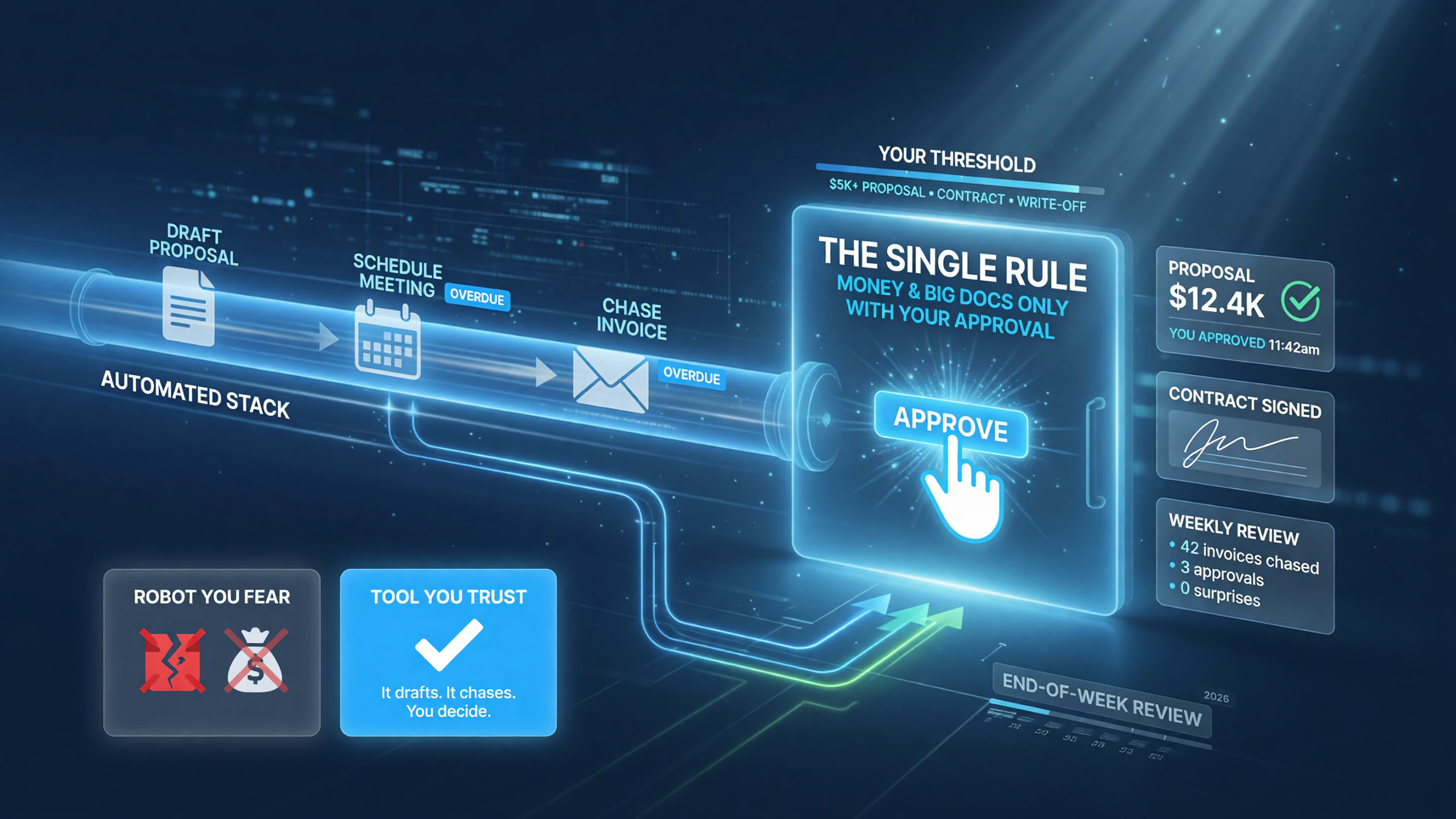
Here is the rule that keeps an entire automation stack safe: money goes out and big documents go out only with your approval. The whole point of the stack is that it does the preparation, the chasing, and the reminders automatically — not that it spends your money or commits you to clients without a check.
\n\n
 \n\n
\n\n
The single rule that keeps an AI back-office stack safe: the automation drafts, chases, and schedules automatically — but money and big documents go out only with your approval above your threshold.
\n\n\n
In practice this means your automation drafts and stages, but you approve before anything irreversible happens: a proposal over a set amount, a contract, a large write-off. The invoicing tool chases automatically because those are routine and reversible. But build in a final human step for the exceptions, and your stack stays a tool you trust rather than a robot you have to babysit or fear.
\n\n
Checklist for this step: decide your approval threshold; configure the automation to pause and notify you above it; keep routine chasing automatic; review what your stack sent at the end of each week.
\n\n
What the Complete Stack Looks Like and Costs
\n\n
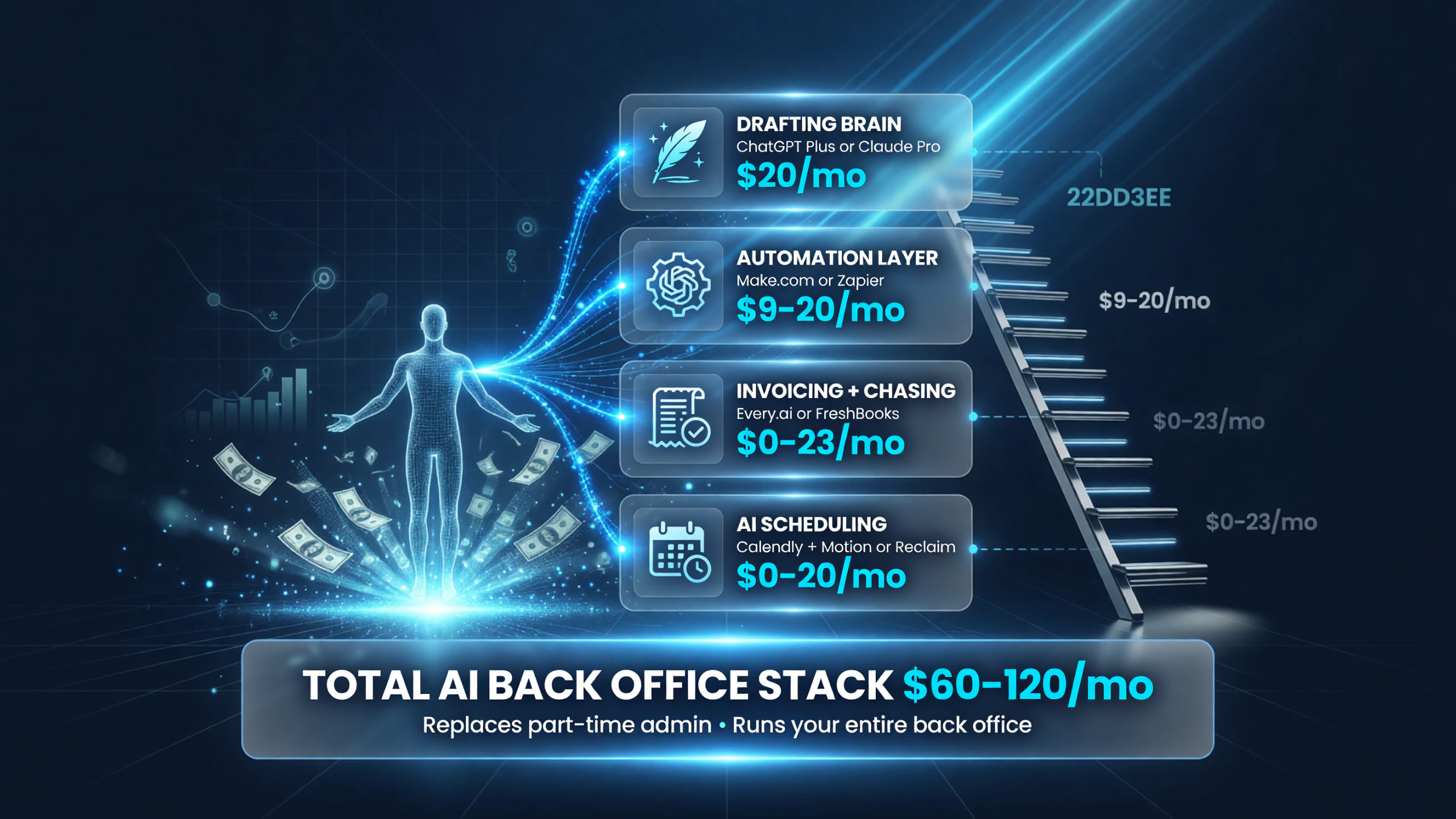
Here is the assembled system — the layer, the tool category, and what it costs per month at the lean-and-effective setup. The total lands between $60 and $120 a month, which for most solo operators replaces the cost and coordination headache of part-time help.
\n\n
 \n\n
\n\n
The one-person AI back-office stack in 2026: drafting ~$20, automation ~$9–20, invoicing $0–23, and scheduling $0–20 a month — roughly $60–120 total replacing part-time admin help.
\n\n\n
| Stack Layer | What It Handles | Tool to Start With | Monthly Cost |
|---|---|---|---|
| Drafting brain | Proposals, emails, invoice copy, contracts | ChatGPT Plus / Claude Pro | ~$20 |
| Automation glue | Connects apps, fires workflows | Make.com / Zapier | ~$9–$20 |
| Invoicing & chasing | Bills, reminders, overdue follow-up | Every.ai / FreshBooks | $0–$23 |
| Scheduling | Client booking, focus-time defense | Calendly + Motion/Reclaim | $0–$20 |
| Client hub (optional) | Contacts, pipeline, history | HubSpot free / Every.ai | $0 |
\n\n
If you have no interest in managing five subscriptions, an all-in-one AI-native platform like Every.ai (around $15 a month) does CRM, proposals, invoicing, and client portals in one place with a conversational agent that reads your actual data — say “create an invoice for ACME Consulting for $5,000” and it does. That option trades a little flexibility for far fewer logins, and for many pure solo operators it is the better starting point.
\n\n
How Much Time Does It Actually Save?
\n\n
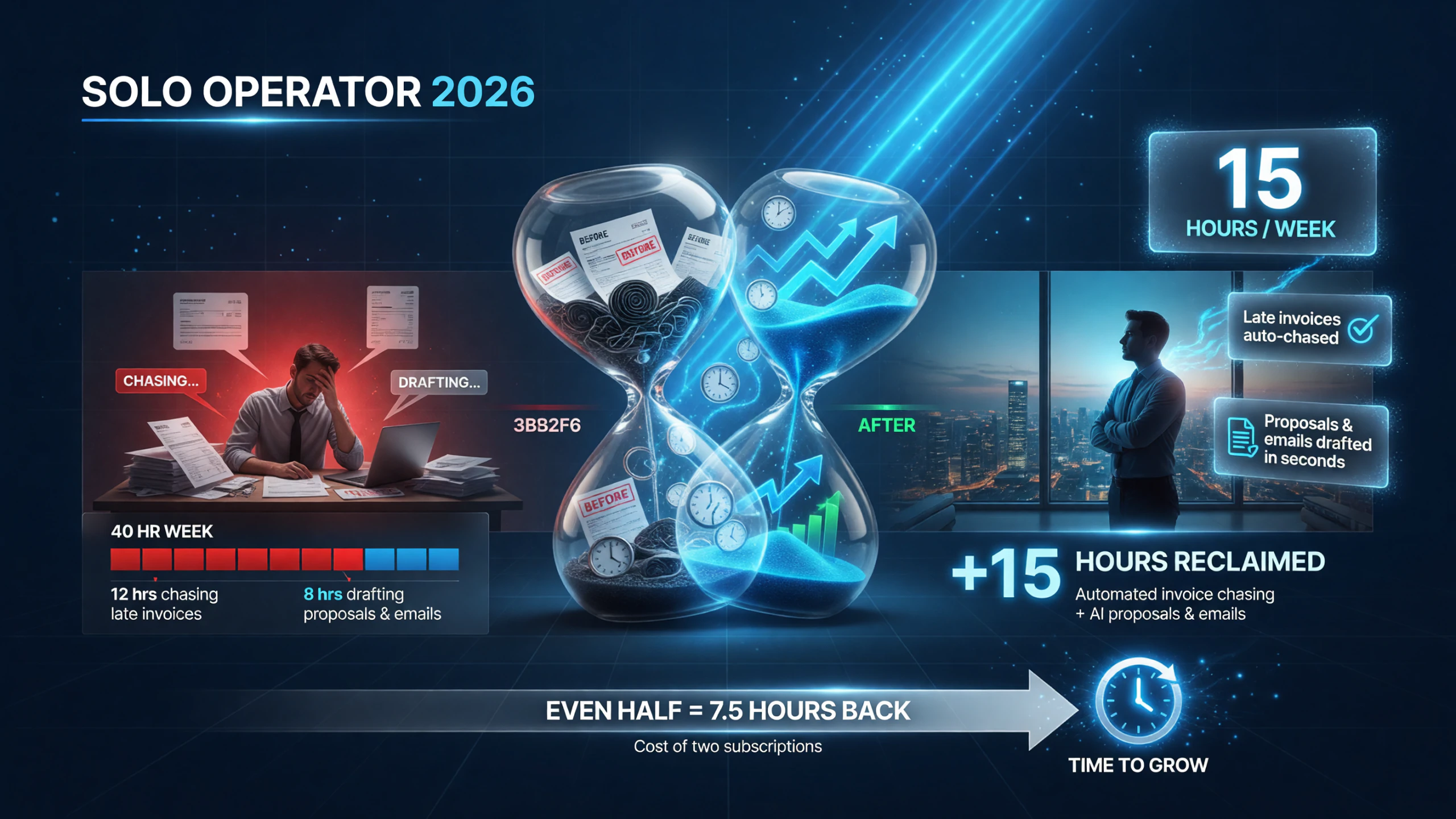
The realistic claim is 10 to 20 hours a week for a solo operator with a real client base, most of it from the chasing and the drafting.
\n\n
 \n\n
\n\n
A solo operator can buy back 10 to 20 hours a week — most from automated invoice chasing and AI drafting — and even half of that is five to ten focused hours back for the cost of two subscriptions.
\n\n\n
| Back-Office Task | Manual Time (hrs/mo) | With AI Stack (hrs/mo) | Hours Saved |
|---|---|---|---|
| Proposals & client writing | 8 | 2 | 6 |
| Invoicing & chasing payments | 10 | 1 | 9 |
| Scheduling & rescheduling | 6 | 1 | 5 |
| Email triage & data entry | 8 | 1 | 7 |
\n\n
Those are representative figures from solo-operator case studies reported in 2026 — real numbers vary by how many clients and how much admin you actually carry. But even if you reclaim half of that, you have bought back five to ten hours of your working week for the cost of a couple of subscriptions. That is the math that makes the stack an obvious decision, not a tech hobby.
\n\n
Make the Stack Work for You: Where to Start Today
\n\n
Do not automate everything at once. You will overwhelm yourself, break a workflow, and give up on the whole idea. The order that works:
\n\n
Morning one: set up the drafting assistant and write one proposal with it. This is the fastest win and the foundation everything else drafts from.
\n\n
First week: build one automation scenario for your most repetitive task — the thing you copy-paste between two apps most often.
\n\n
First month: turn on automated invoice chasing so you stop carrying the mental load of who owes you what.
\n\n
Then: add AI scheduling to protect your focus time, and review the whole flow weekly with a human-approval gate on anything big.
\n\n
By the end of the first month you will not be running a business and also doing its back-office — you will be running a business whose back-office runs itself. That is the difference between a solo operator who is always behind and one who has reclaimed the hours to grow.
\n\n
Frequently Asked Questions
\n
How much does a one-person AI back-office stack cost in 2026?
\n
A complete stack runs $60 to $120 a month at the lean-and-effective setup: a drafting assistant (~$20), an automation layer (~$9–$20), AI invoicing ($0–$23), and AI scheduling ($0–$20). An all-in-one AI-native option like Every.ai costs around $15 a month and bundles most of these.
\n
Can AI really replace a virtual assistant for a solo business?
\n
For routine back-office work, largely yes. AI handles drafting, scheduling, invoicing, chasing, and data entry that used to require part-time help. The important caveat: keep a human approval gate on anything involving large money or contracts, and review what the stack sends weekly.
\n
Do I need to be technical to set up an AI back-office stack?
\n
No. Modern automation tools accept plain-English descriptions — you tell them the workflow you want and the AI builds it. Start with one simple scenario, confirm it runs, then add more. You do not need to write code or understand APIs.
\n
What’s the fastest way to start automating my back-office?
\n
Start with the drafting assistant — write one proposal with it. It is the fastest win and sets up every other layer. Then in the first week build one automation for your most repetitive task, and within a month turn on automated invoice chasing so you stop hunting down overdue payments.
\n
Is it safe to have AI send invoices and chase clients automatically?
\n
Yes, with one rule: automated chasing is safe because it is routine and reversible, but keep a human approval step before anything irreversible like a contract, a large write-off, or a big commitment. Configure your automation to pause and notify you above your chosen threshold.
\n\n\n\n\n
\n\n
 \n
\n
About Barak Schurr
\n
Barak Schurr built and sold a major ticketing platform, ran global nightlife operations at Eventbrite, and now spends his time figuring out which AI tools actually move the needle for independent business owners — and which ones are just noise. No hype. No fluff. Just what works.
Email: [email protected]
\n
\n
\n\n
More AI Tools for Business
\n
 \n
\n\n
 \n
\n\n
\n
\n\n\n\n\n\n\n