Get The Solo Business OS — Free
The AI workflow that replaces a part-time employee for solo operators and small business owners.
Wrike Conversational AI Agent Builder: Build a Custom Assistant by Chatting, Not Coding
⚡ Expert Summary: Wrike just put a conversational AI agent builder inside its work management platform, letting US teams create custom assistants by describing what they want in plain language — no code, no forms, no drag-and-drop builders. You tell the AI “build an agent that triages incoming requests and drafts replies,” and it configures the workflow, connects the right tools, and deploys the agent for you. For small and mid-size business owners drowning in repetitive tasks, this is a meaningful step: instead of learning automation software, you just describe the outcome you want.
What Is Wrike’s Conversational AI Agent Builder?
Wrike, the work management platform used by more than 20,000 customers worldwide, has been rolling out its new conversational agent builder as part of its 2026 AI push. The core idea is straightforward: instead of configuring automations through a visual form builder or writing scripts, you build a custom AI agent by having a conversation. You type what you need the agent to do, Wrike’s AI translates that into a working workflow, wires up the relevant apps, and deploys the assistant inside your workspace.
This matters for one reason: the biggest barrier to automation was never the software — it was the setup. Traditional automation tools demand that you understand triggers, conditions, actions, and integrations before you can ship a single useful workflow. The conversational builder removes that entire learning curve. If you can describe a task in a sentence, you can now build an agent that handles it.
Why This Is a Big Deal for US Business Owners
For a US business owner, the pitch is concrete. Consider the daily admin work that quietly eats your time: routing inbound requests, chasing status updates, sending follow-up emails, updating project status, answering the same questions over and over. Each of those is a candidate for an AI agent — if building one didn’t take an afternoon of setup. Wrike’s conversational builder collapses that from hours to minutes.
It’s part of a wider shift across business software in 2026: the interface is becoming the model. Rather than a blank form with a hundred fields, you get a conversation. And for owners who don’t have a dedicated operations or IT person, that’s the difference between “automation is for enterprise teams” and “I can build this myself in five minutes.”
How the Conversational Agent Builder Works
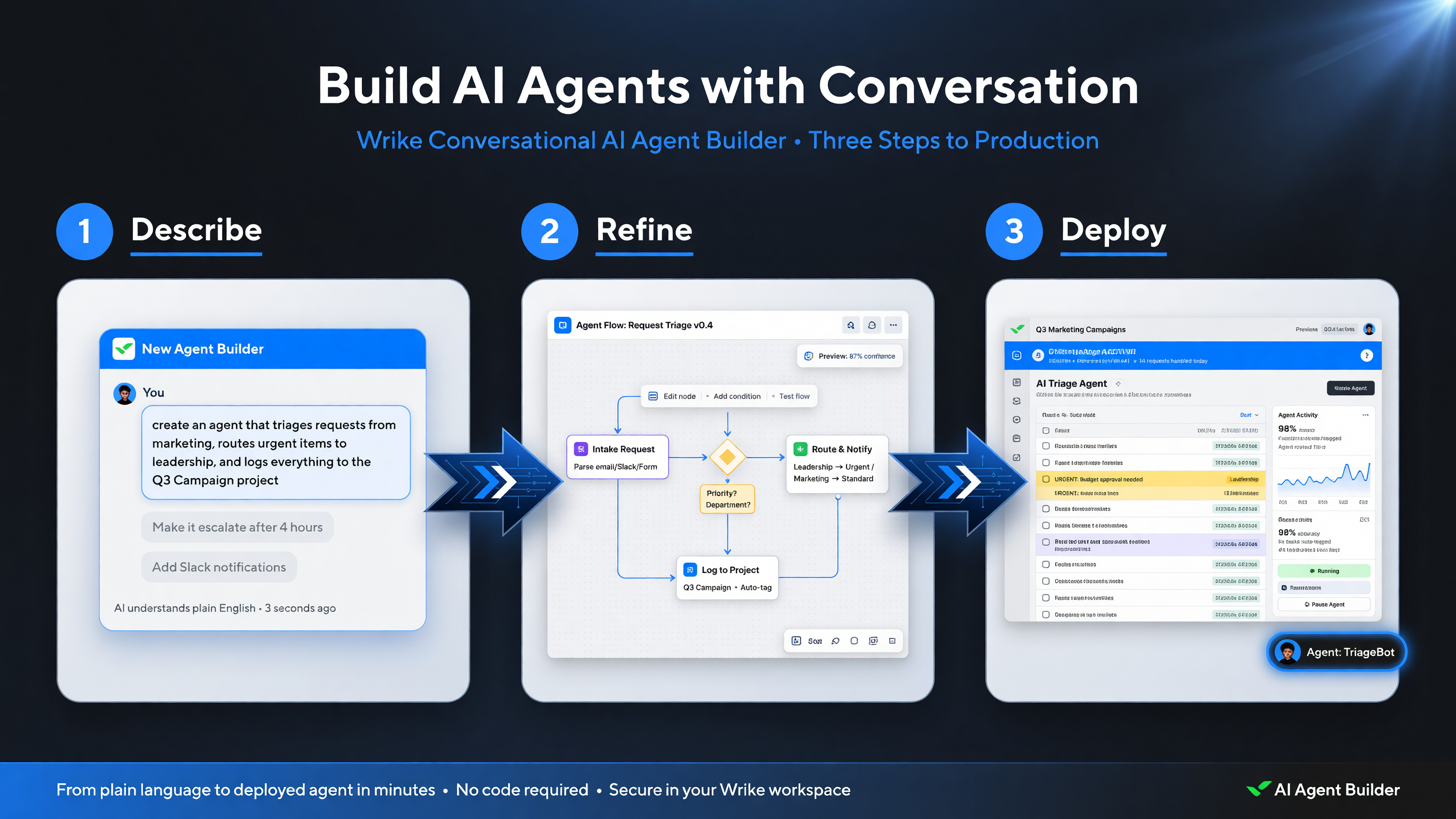
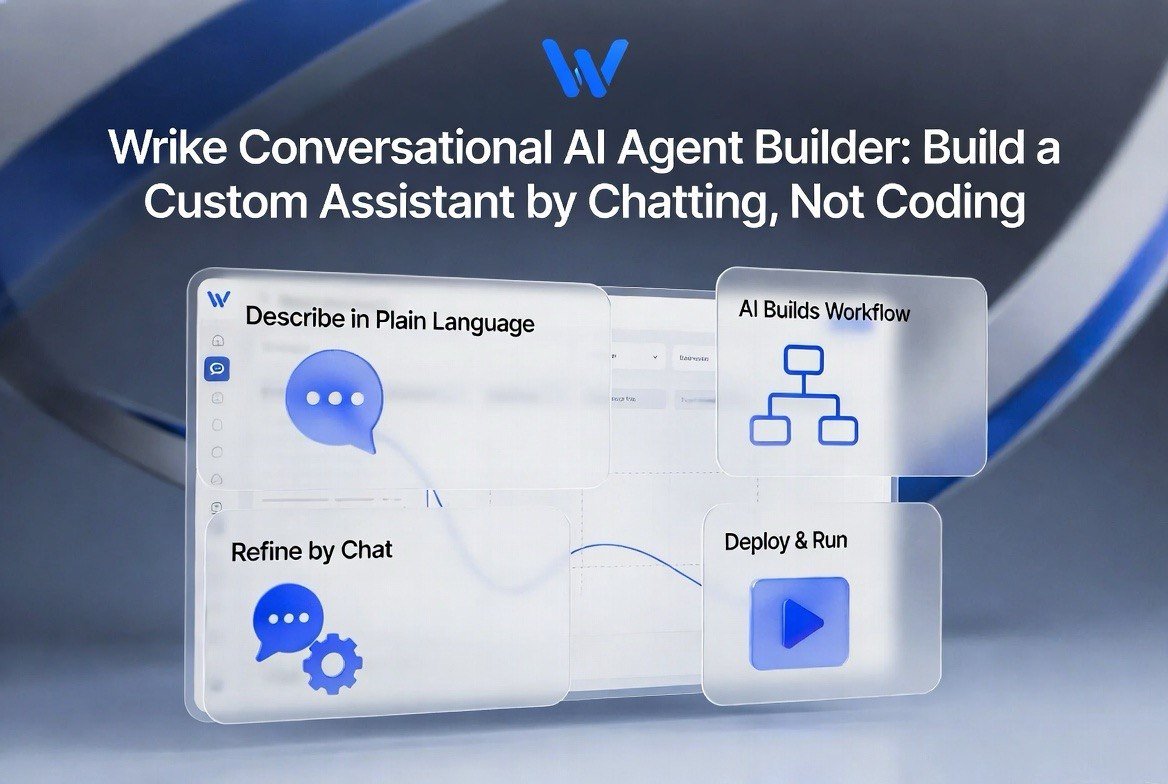
The conversational builder collapses setup into three steps: you describe the agent in plain language, refine the workflow it builds, then test and deploy it inside your workspace.
Wrike’s approach fits into three steps that feel natural even to a first-time user:
1. Describe the Agent in Plain Language
You start with a prompt: “Create an agent that collects request details from my team and drafts a project brief.” The AI parses the intent, identifies the inputs it needs, and proposes a structure back to you. This is where the model does the heavy lifting — understanding intent is the human-to-AI translation that used to be the hardest part of automation.
2. Review and Refine What It Built
The builder shows you the workflow it created — the triggers, the steps, the connected actions — and lets you refine it conversationally. “Make it also notify my sales team” or “Use a weekly summary instead of per-item updates.” You’re editing the automation by talking, not by hunting through dropdown menus.
3. Test and Deploy
Once you’re satisfied, you test the agent against real or sample data, then deploy it into your workspace where it runs continuously. Because it lives inside Wrike alongside your projects and tasks, the agent has context — it knows your project structure, your teams, and your ongoing work, which is what makes its outputs actually useful rather than generic.
The Difference Between a Chatbot and an Agent Builder
It’s worth being precise about the vocabulary, because the difference matters for buying decisions. An AI chatbot answers questions — it’s reactive. An AI agent performs tasks — it’s proactive. Wrike’s builder is designed to create the latter. When you build an agent that drafts a project brief, it doesn’t just answer your question; it creates the artifact and takes the workflow step for you, integrated with your other tools.
For a business owner evaluating this, that distinction is the whole point. You don’t need another chat window; you need work to get done without you doing every step. The conversational agent builder is aimed squarely at that.
Table: Wrike Conversational Agent Builder at a Glance
| Capability | What It Means |
|---|---|
| Build method | Plain-language conversation, no code or forms |
| Agent capabilities | Draft content, triage requests, update tasks, trigger workflows |
| Integration | Connects to apps inside the Wrike workspace |
| Edit style | Conversational refinement, not menu hunting |
| Best for | Teams without dedicated automation expertise |
How to Evaluate an Agent Builder for Your Business
If you’re considering Wrike’s conversational builder — or comparing it to rivals like Asana, ClickUp, or Monday.com, which are all shipping AI agents of their own — work through a five-step evaluation before you commit. This keeps the decision grounded in your actual operation rather than the demo.
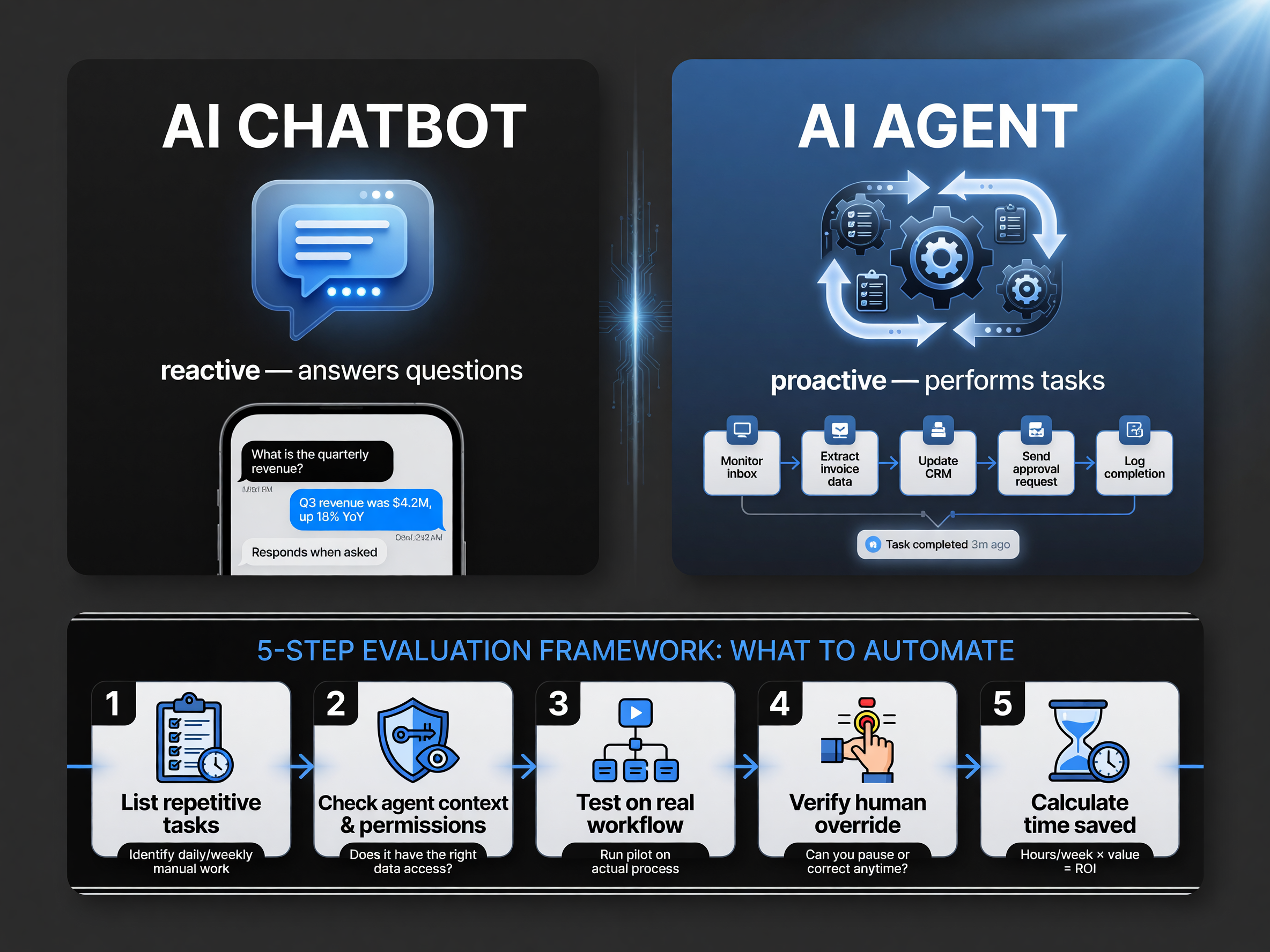
Know the difference before you build: a chatbot reacts to questions, an agent performs tasks. Pair that clarity with a five-step framework to pick the tasks worth automating.
1. List the Repetitive Tasks You Actually Hate
Start concrete. Which tasks recur daily or weekly and follow a predictable pattern? Request intake, status follow-ups, meeting notes, weekly reports. These are the ideal agent candidates — they’re structured enough for an AI to learn and repetitive enough to pay off.
2. Check the Agent’s Context and Permissions
An agent is only as good as its access. Does it understand your project structure and team roles? Can it act on your behalf, and within what limits? For a business owner, the question of guardrails — what the agent can and cannot change — matters more than raw capability.
3. Push on Real Workflow, Not a Demo
Every vendor demo looks great. The real test is whether the builder handles your messy workflow — your naming conventions, your approval chains, your exceptions. Run one agent end-to-end on real data before you roll out a fleet.
4. Verify the Human Override
Can you see what the agent did, pause it, and correct it? The best agent tools are transparent and reversible. If an agent can lock you into a wrong workflow with no easy undo, that’s a red flag.
5. Calculate Time Saved, Not Just Features
Estimate hours saved per week on the tasks you automated. If an agent builder saves you five hours a week, that’s 260 hours a year — the ROI math becomes obvious. Measure against your actual workload, not the feature list.
Table: Agent Builder Comparison Snapshot
| Platform | Agent Builder | Standout Angle |
|---|---|---|
| Wrike | Conversational (plain-language) | Build by chatting, no forms |
| Asana | AI teammates | Deep project-task context |
| ClickUp | AI agents + Brain | Broad app integrations |
| Monday.com | AI agents | Workflow automation focus |
Real Example: What a Business Owner Can Automate in One Hour
Let’s make this concrete with a scenario any US service business owner will recognize. Say you run a small agency taking client work through a shared inbox, a contact form, and occasional Slack messages. Your bottleneck isn’t the work itself — it’s the intake. Every project has to be logged, scoped, and assigned, and right now that’s a human repeating the same copy-paste routine dozens of times a week.
With a conversational agent builder, you describe the fix: “When a new request comes in with the word ‘project,’ create a task, tag it with the right department, and draft an acknowledgment email.” The AI builds that workflow, connects it to your inbox and your task board, and deploys it. What took an hour of setup replaces a task that was eating two hours a week before you started. Over a quarter, that’s roughly 24 hours returned — from a single workflow built by conversation.
Where the Time Actually Comes Back
The hours don’t come back all at once; they come back in the gaps. The 90 seconds you’d spend fixing a misrouted request. The five minutes drafting a status update that was really just a template. The repeated question that an agent answers from your own docs. Individually each is small, but they compound. This is why the conversational builder is powerful: it turns previously one-off automation projects into something you can spin up while the coffee brews.
What to Automate First
Start with the highest-frequency, lowest-judgment tasks. High-frequency means the payoff repeats; low-judgment means the AI is unlikely to make a costly mistake. Request intake, template drafting, status summarization, and reminder generation all fit the profile. Save the high-judgment work — contract decisions, pricing, anything with financial or brand risk — for humans, at least until you’ve watched the agent earn trust over several weeks.
The Cost Question: Is This Worth It for a Small Business?
Wrike’s pricing structure has historically included AI features at various tiers, and the conversational agent builder is positioned as part of the platform’s AI capability rather than a separate expensive add-on. For a small business, the real cost question isn’t the monthly subscription — it’s whether the time saved exceeds the setup effort and the ongoing need to supervise the agent.
Do the arithmetic honestly. If an agent saves you even four hours a month, and you value your time at a conservative $50 an hour, that’s $200 a month of value. Against a work-management subscription that includes AI agents, the math clears quickly for most teams. Where it doesn’t pay off: teams that are so small or so unstructured that there’s no repeatable workflow to automate yet. If every week is completely different, there’s less for an agent to learn, and the ROI stays thin.
The Bigger Picture: The Interface Is Becoming the Model
Wrike’s conversational builder is one example of a broad 2026 trend: the natural-language interface is replacing the form. Gartner has projected that by 2026, more than 40% of employees could use natural-language AI to build or customize their own automations, up from single digits in recent years. When the barrier to building an agent drops to a conversation, the number of people who can build one grows dramatically.
For US small and mid-size businesses, this matters because the talent gap has been the real constraint. You can’t always hire a process-automation specialist, but you already know how to describe what you need done. Tools that translate description into working automation close the gap between intent and execution — and that’s where the productivity upside lives.
That said, the conversational builder is not magic. It still requires you to think clearly about what a good workflow looks like. The AI handles the translation; you still supply the judgment. The businesses that win with agent builders are the ones that show up with a clear sense of which tasks deserve automation in the first place.
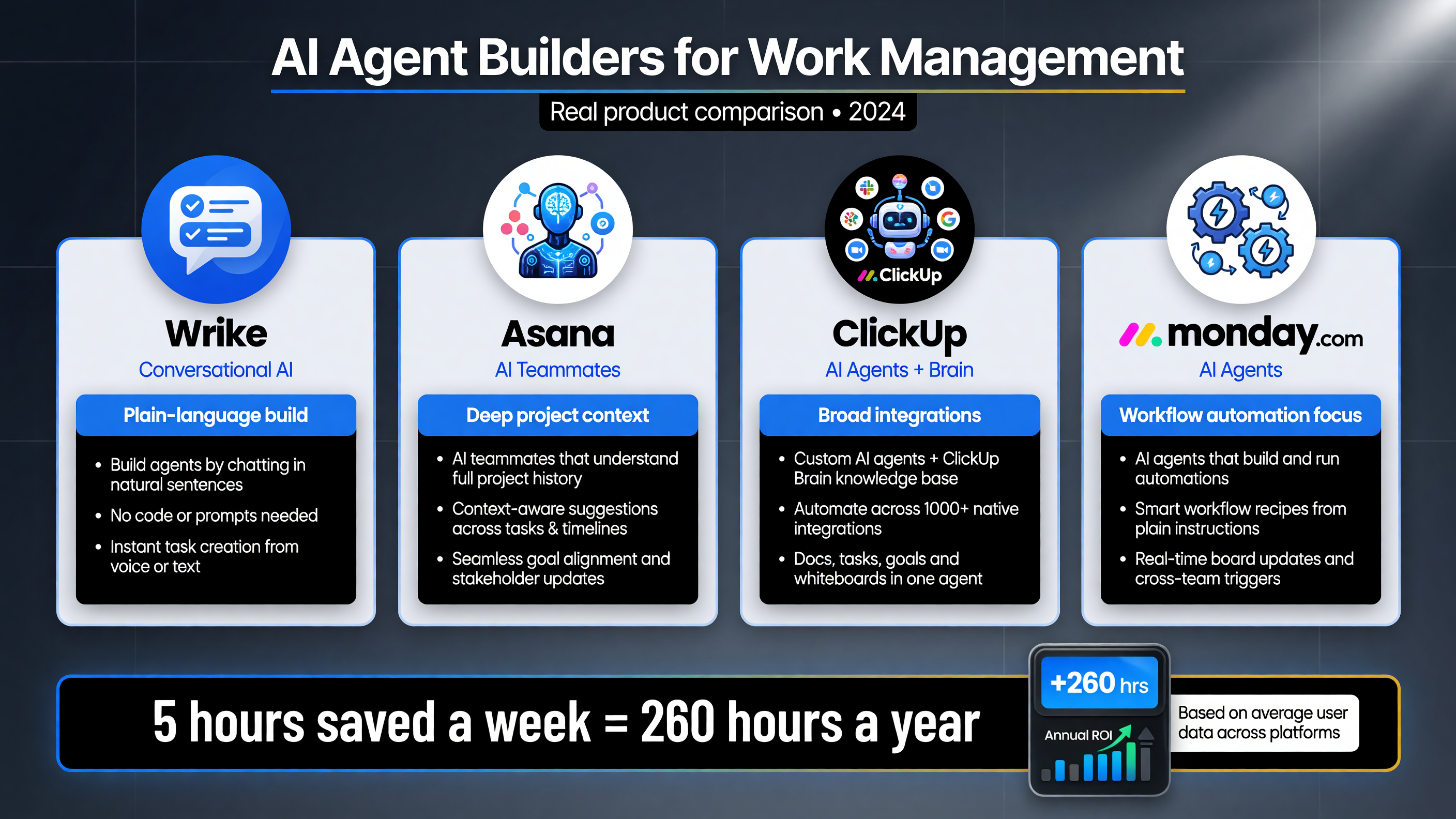
Wrike differentiates on the conversational, plain-language build method. Asana, ClickUp, and Monday.com each ship AI agents with different strengths in project context, integrations, and workflow automation.
FAQ: Wrike Conversational AI Agent Builder
Wrike isn’t alone in this direction. Asana introduced AI teammates that work inside projects, ClickUp shipped agent capabilities tied to its knowledge features, and Monday.com positioned AI agents around workflow automation. The differences between them come down to execution details: how much project context the agent sees, how many external integrations it reaches, and how naturally the builder translates plain language into a working workflow. For a buyer, the deciding factor should be fit with your existing stack — the agent is most useful where your work already lives.
There’s a practical caution worth flagging. Every new agent you deploy is also something you must monitor, especially in the first weeks. Agents occasionally interpret instructions differently than you intended, or act on stale data. Treat the first deployment of each agent like onboarding a new employee: supervise closely, correct early, and formalize the workflow once it runs clean. This supervision cost is real, and the teams that account for it avoid the trap of building agents that quietly drift out of usefulness.
AI agents that build themselves by conversation are changing how US business owners think about automation. The question isn’t whether to use them — it’s which tasks deserve one and how to keep them under control. Wrike’s conversational builder is a solid entry point, but the real wins come from choosing the right tasks to automate and measuring the hours you get back.
About the Author

Barak Schurr built and sold a major ticketing platform, ran global nightlife operations at Eventbrite, and now spends his time figuring out which AI tools actually move the needle for independent business owners — and which ones are just noise. No hype. No fluff. Just what works.