Constant Contact in Claude: AI Email Campaigns for SMBs
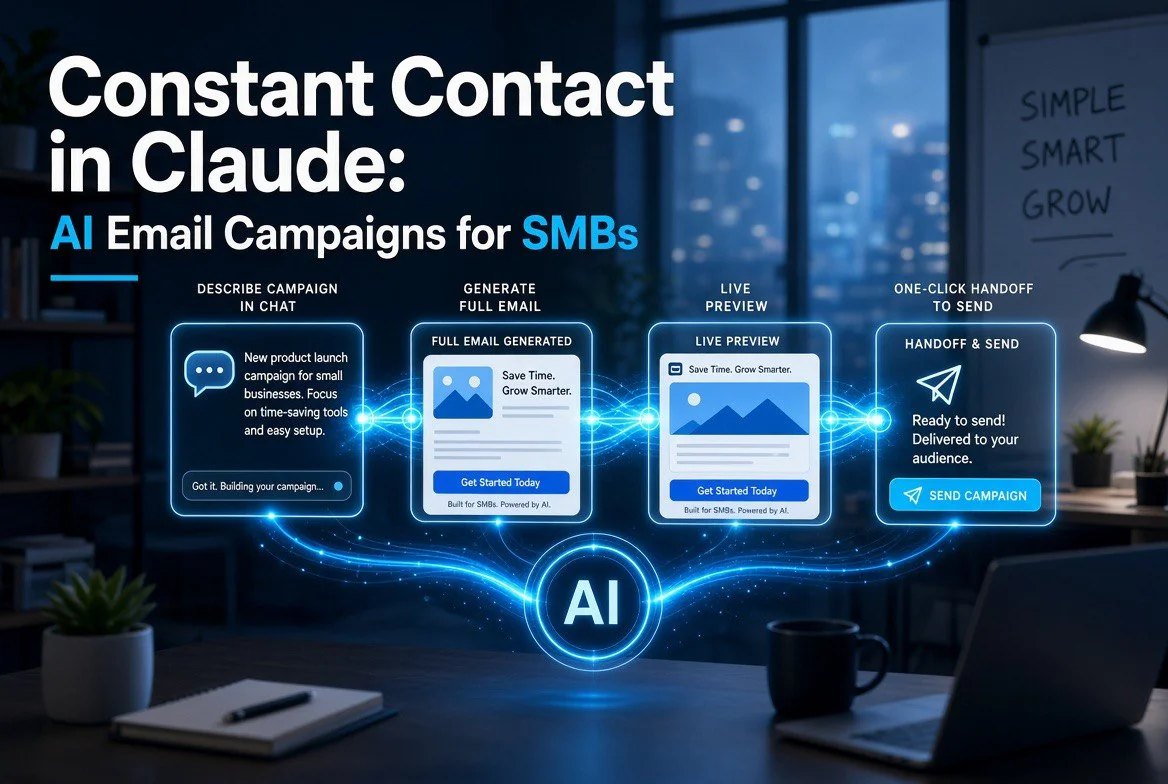
⚡ Expert Summary: On September 10, 2026, Constant Contact launched an official connector inside Claude, letting a US small business owner describe a campaign in plain language and get a fully built email — subject line, preheader, body, CTA, and images — with one-click handoff to send. Average SMB email open rates sit at 30.8% and email still returns roughly $36 for every $1 spent, so the real win here isn’t “AI writes copy.” It’s cutting campaign build time from about two hours to twenty minutes. Deliverability, list hygiene, and reporting are still yours to own.
Here’s the part most announcements bury: you already pay $20 a month for Claude. You probably already pay somewhere between $12 and $80 a month for an email platform. The new connector is the bridge between two bills you were already paying — and that changes what a Wednesday afternoon looks like for a business without a marketing hire.
I’ve watched a lot of “AI features” get announced this year that amount to a text box sitting next to a form. This one is different in a specific, measurable way: it moves the work, not just the words. Let’s break down what it actually does, what it does not do, and whether a US small business owner should bother installing it.
What Constant Contact Actually Shipped on September 10
The announcement came through PR Newswire on September 10, 2026, positioning the integration as Constant Contact’s conversational front door for Claude users. It follows the same pattern the company already ran with a ChatGPT app earlier in 2026, which is a useful signal: the email vendor treating AI assistants as a distribution channel, not a threat.
What the connector does, concretely:
- Builds a campaign conversationally. You describe your business, your audience segment (new customers, previous buyers, lapsed accounts), the goal, the tone, and any assets like logo or image URLs from your library. Claude returns a full draft.
- Renders live previews. Desktop and mobile views update as you iterate — “shorten the intro,” “change the button color,” “make this sound less corporate.”
- Generates channel-specific variants. Separate subject lines, preheaders, social captions, and CTAs tuned for email versus Instagram, Facebook, or LinkedIn.
- Hands off with one click. Claude generates a link that transfers the campaign — tracking codes included — to your Constant Contact account for audience selection, final edits, scheduling, and launch. Images can be pushed straight into your Constant Contact library.
Installation is unglamorous and takes about three minutes: open Claude, go to the settings or apps area, search for the Constant Contact connector, install it, connect your account. No new login, no new subscription line item, no migration.
That last point matters more than it sounds. The most common failure mode for small business software isn’t bad features — it’s that the tool sits in a tab nobody opens. When the builder lives inside the assistant you already talk to for proposals, invoices, and research, the activation energy collapses.
Why This Is Different From “AI Writes Your Email”
Plenty of platforms have shipped AI subject line generators. Most of them are a button that produces three mediocre options and calls it innovation. The distinction here is scope of the handoff.
Compare the two workflows directly:
| Workflow Stage | Traditional Platform Build | Constant Contact in Claude |
|---|---|---|
| Strategy and angle | You think it through, take notes elsewhere, then open the platform | Describe the goal in the same conversation; the plan and the draft are one step |
| Copywriting | Free AI subject line generator, then manual writing for the body | Full email body, subject, preheader, and CTA generated together |
| Design and preview | Drag-and-drop template blocks, then a separate preview click | Live desktop and mobile previews inside the chat as you refine |
| Channel variants | Rewrite separately for each social platform | Email, Instagram, Facebook, and LinkedIn captions generated as a set |
| Asset upload | Manual upload into the media library | Images uploaded to the Constant Contact library from the conversation |
| Send | Select audience, schedule, launch in the platform | One-click link transfers the campaign with tracking codes intact — you still pick the audience and hit launch |
| Deliverability and compliance | Platform handles sending infrastructure | Unchanged — Constant Contact still owns sending infrastructure |
Read that bottom row carefully, because it is the entire value proposition in one line. The connector moves the creation work. It does not move the delivery work, and you should not want it to. Sending reputation, authentication, spam complaint handling, and unsubscribe compliance are the unsexy infrastructure that a marketing platform spends a decade building. Handing that to a general-purpose assistant would be reckless.
So the honest framing is: Constant Contact quietly became an API endpoint for your own ideas. The assistant drafts. The platform delivers. You approve.
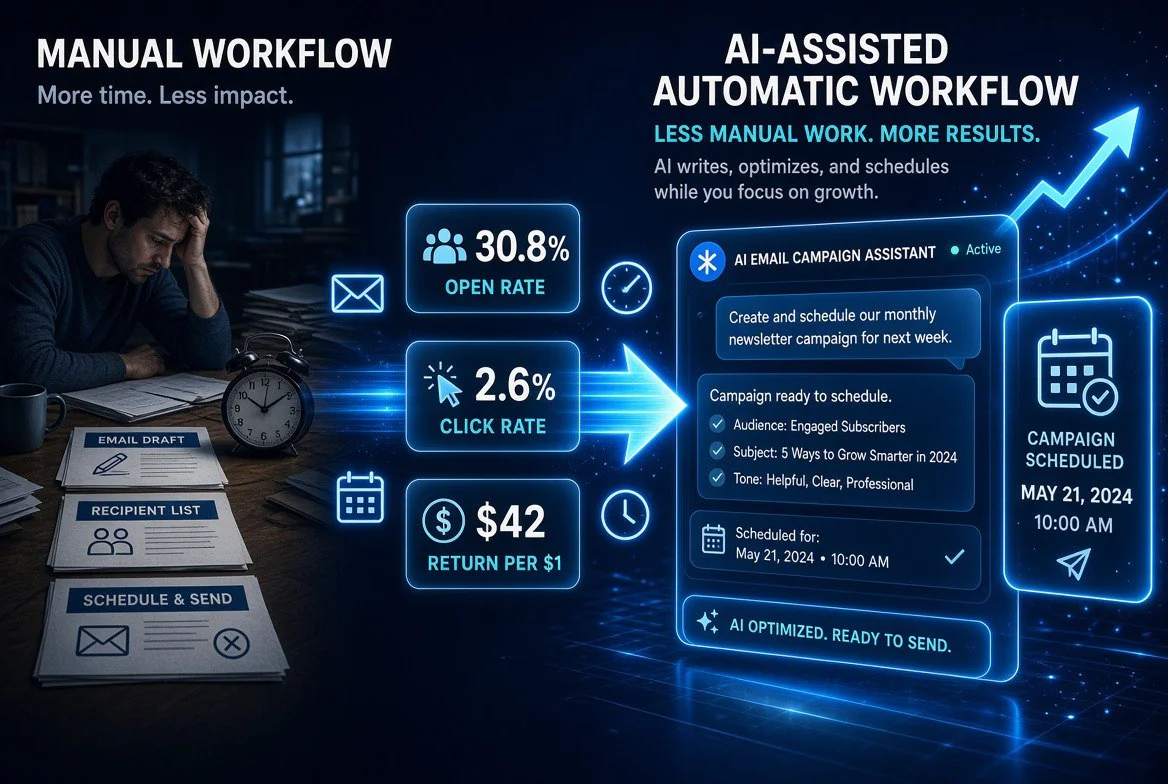
The shift the connector creates: instead of drafting, formatting and scheduling a campaign by hand, the same campaign gets written and scheduled inside one chat window. The benchmarks that make email worth the effort — 30.8% open rate, 2.6% click rate, $42 back per $1 spent — stay intact.
What the Numbers Say About Email in 2026
Before you decide whether a twenty-minute campaign build is worth caring about, look at what email is still doing for businesses this size.
| Metric | Benchmark | Source |
|---|---|---|
| Return per $1 spent on email | $36 to $42 | Litmus data, 2026 benchmarks |
| Average small business open rate | 30.8% | Constant Contact industry data, early 2026 |
| Average click-through rate | 2.0% to 2.6% | Aggregated 2026 benchmark reports |
| Owners naming email their most valuable channel | 41% | 2026 SMB marketing survey data |
| Reported speed gain sending with AI assistance | About 23% faster | Constant Contact AI product data |
| Welcome email open rate range | 42% to 84% | Litmus and Omnisend 2026 benchmarks |
Two of those rows deserve a closer look.
First, the ROI comparison. Paid social typically returns somewhere between $2 and $5 per dollar spent. Email returns $36 to $42. If you are a business owner deciding where the next hour of your week goes, that gap is not a rounding error — it is a signal about which channel actually compounds. An email list is an asset you own. A social following is rented reach that can be repriced or throttled at any time.
Second, the 30.8% open rate deserves a warning label. Apple’s Mail Privacy Protection pre-loads tracking pixels, which inflates reported opens — in some datasets by fifteen to twenty percentage points. So if your dashboard shows a 44% open rate and you’re feeling great about it, a meaningful chunk of that number is a machine loading an image, not a human reading your subject line. The more reliable signal post-MPP is click-to-open rate, which typically lands in the 6% to 10% range and reflects people who actually engaged.
This is exactly where a conversational build helps in a way that a “write my subject line” button does not. When you can regenerate the intro, the subject, and the CTA in one conversation in under a minute, you stop treating each email as a one-shot gamble. You test. You iterate. You send the version that earns the click.
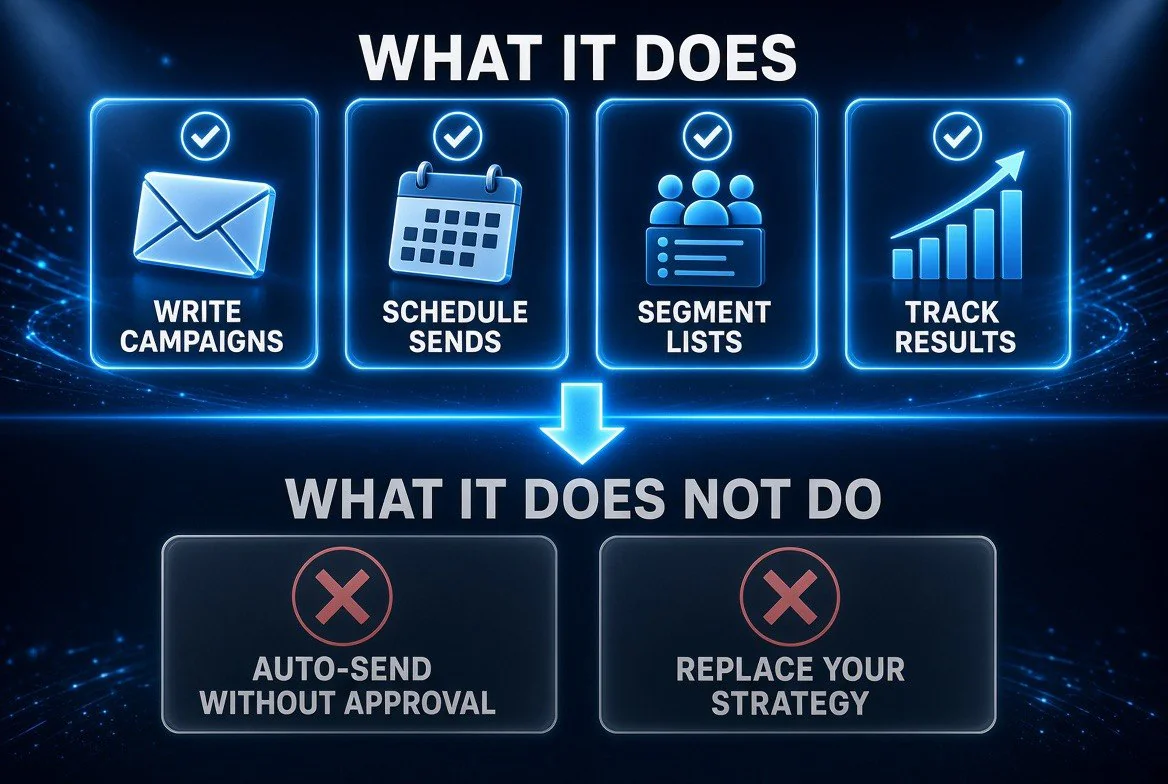
What the connector actually hands over, and what it explicitly does not. Writing, scheduling, segmentation and reporting move to AI. Final approval and overall marketing strategy stay with you. That boundary is the reason the tool is safe to run inside a small business.
What It Does Not Do — And the Gap You Still Own
Let’s be direct about the limits, because this is where most AI marketing coverage goes soft.
It does not fix your list. If your list contains 4,000 contacts where 2,200 haven’t opened anything in fourteen months, an AI-assisted campaign will not save you. Mailing dead contacts damages sender reputation, and reputation is the single asset that decides whether your next campaign lands in the inbox or the promotions tab. List hygiene — re-engagement sequences, sunset policies, bounce cleanup — is still manual judgment work. No connector does that for you, and anyone telling you otherwise is selling something.
It does not own your sending infrastructure. Constant Contact still handles authentication, complaint feedback loops, and unsubscribe compliance. That’s good. It also means your results still depend on how diligently you’ve set up your sending domain, authenticated your records, and kept your complaint rate low.
It does not guarantee good strategy. The connector will happily build a beautifully written campaign for an offer nobody wants, sent to a segment that was wrong from the start. Tone, segmentation logic, offer construction, and send timing are still owner-level decisions. The tool removes production friction, not thinking.
It does not replace knowing your customers. The difference between a 2% and a 5% click-through rate is almost never writing quality. It’s relevance — whether the thing you’re offering matters to the person reading it on a Tuesday morning. An assistant can sharpen the message. It cannot tell you what your customers actually want.
That’s four real gaps. If any of them is your weakest link, spend this week there instead of on tooling.
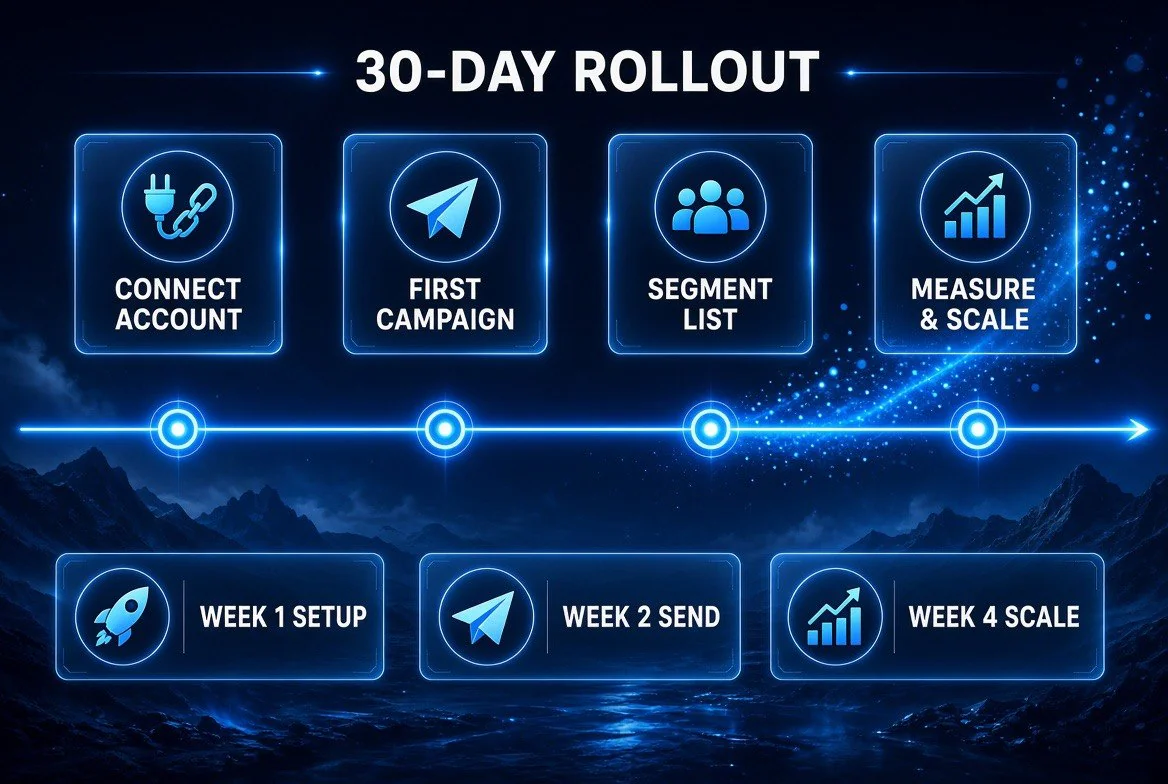
A realistic adoption path for a small business: connect the account, send a first campaign, segment the list, then measure and scale. Four small steps, roughly one month, no developer and no marketing hire required.
How to Actually Use It — A Practical Setup
Assuming your list is in reasonable shape and your sending setup is authenticated, here’s the workflow that gets value in the first week.
Step 1: Connect and pick one recurring campaign
Install the connector, then resist the urge to rebuild everything. Choose the single campaign you send on a predictable schedule — a weekly newsletter, a monthly promotion, a new-customer welcome. One recurring campaign is where friction compounds, so it’s where the connector pays off fastest.
Step 2: Write your business brief once
Describe your business, your audience, your voice, and what you never want to sound like. Save it. This brief becomes the grounding context for every future campaign, which means the tenth email starts from your positioning rather than from a blank template.
Step 3: Build in conversation, refine in preview
Ask for the full draft, then immediately ask for three subject line variants built on different angles — curiosity, urgency, and benefit. Iterate on the mobile preview first. Most of your list reads on a phone, and an intro that “feels” short on desktop is often still too long on a 390-pixel screen.
Step 4: Test one variable, not five
Send to a segment, then change exactly one thing next time — subject line or CTA, never both. You cannot read results from a campaign where six variables moved at once. This discipline is what separates the businesses getting 5% click-through from the ones averaging 2%.
Step 5: Watch deliverability like a hawk
Track bounce rate, spam complaint rate, and unsubscribe rate on every send. A single spike in complaints forces you to stop and diagnose before sending again. This is the part of the job that no AI removes.
The Bigger Shift This Represents
Step back for a second and look at the pattern across 2026. Claude now hosts a connector from a legacy email marketing company. ChatGPT hosts a parallel app. Invoicing, CRM, bookkeeping, and payment tools have all shipped assistant integrations this year.
What’s actually happening is that the assistant layer is becoming the operating surface, and the specialist platforms are becoming the engines behind it. You describe the outcome in one place and the work routes to whichever system is built to execute it. For a small business owner, that’s a significant structural change: instead of remembering which of nine tabs does what, you state the goal and let the stack assemble itself.
The businesses that win this transition will not be the ones with the most tools installed. They’ll be the ones whose data is clean enough for the assistant to be useful. An assistant drafting campaigns against a corrupted list with stale engagement data produces faster garbage. Clean data plus conversational tooling is the actual advantage.
The Verdict for a US Small Business Owner
If you already use Claude and already pay for Constant Contact, install the connector this week. The setup is minutes, the added cost is zero, and the time savings on a recurring campaign are real and repeatable.
If you use Claude but a different email platform, this is a reasonable moment to ask whether your provider has an assistant integration — and if not, whether they have one coming. Email is too valuable a channel (thirty-six dollars returned per dollar spent) to run through a platform that keeps you doing manual production work.
If you’re not running email consistently at all, none of this matters yet. Build the list first. Send one campaign a month with a real offer to a real segment and watch the click-through rate. Get that working before you optimize the tooling around it.
For more on the category, see our AI tools for small business archive, where we track which of these integrations actually pay off.
The honest summary: this connector is not a revolution. It’s a good, well-scoped tool that removes roughly an hour and a half of production friction per campaign for the businesses that need it most — the ones where the owner is the marketing department. That’s worth a three-minute install and an honest look at your own list.
Frequently Asked Questions
What is the Constant Contact connector in Claude?
It’s an official integration launched September 10, 2026 that lets you build complete email campaigns and social posts inside Claude. You describe your business, audience, and goal, and Claude generates a full draft with subject lines, preheaders, CTAs, and image support. When you’re ready, a one-click link transfers the campaign into your Constant Contact account for audience selection, scheduling, and sending.
Does the Claude connector replace Constant Contact?
No. It replaces the manual production work of writing and assembling campaigns. Constant Contact still owns the sending infrastructure, deliverability management, tracking codes, audience data, and reporting. You still select the audience and hit launch from Constant Contact.
Is the connector free to use?
The connector itself adds no separate charge — you connect an existing Constant Contact account to your existing Claude account. Your costs remain what you already pay for each service.
Can Claude send the email for me automatically?
Not directly. Claude generates a campaign link that hands the finished draft to your Constant Contact account with tracking codes intact. You review, choose the audience, and launch inside Constant Contact. That’s a deliberate design choice, not a limitation — deliverability and compliance stay with the platform built for them.
Will AI-written emails hurt my deliverability?
Not on their own. Deliverability depends on sender authentication, list quality, bounce and complaint rates, and engagement history. AI can accelerate the production of a campaign that performs badly if your list is dirty — but the writing tool itself is not what determines inbox placement.
Should a small business owner use this or just hire a copywriter?
They solve different problems. A copywriter brings strategy, positioning, and offer thinking. The connector brings speed on iterative production work. If your strategy is sound and your constraint is hours, the connector wins on cost per campaign. If your messaging has never converted, the tool will confidently produce more of what isn’t working.
What’s the biggest mistake owners make with AI email tools?
Sending to dead contacts because the list was never cleaned. Reputation damage from high complaint rates takes months to repair, and no amount of good copywriting recovers from an inbox placement problem. Clean your list before you optimize your copy.

About Barak Schurr
Barak Schurr built and sold a major ticketing platform, ran global nightlife operations at Eventbrite, and now spends his time figuring out which AI tools actually move the needle for independent business owners — and which ones are just noise. No hype. No fluff. Just what works.
Email: [email protected]
More AI Resources for Your Business