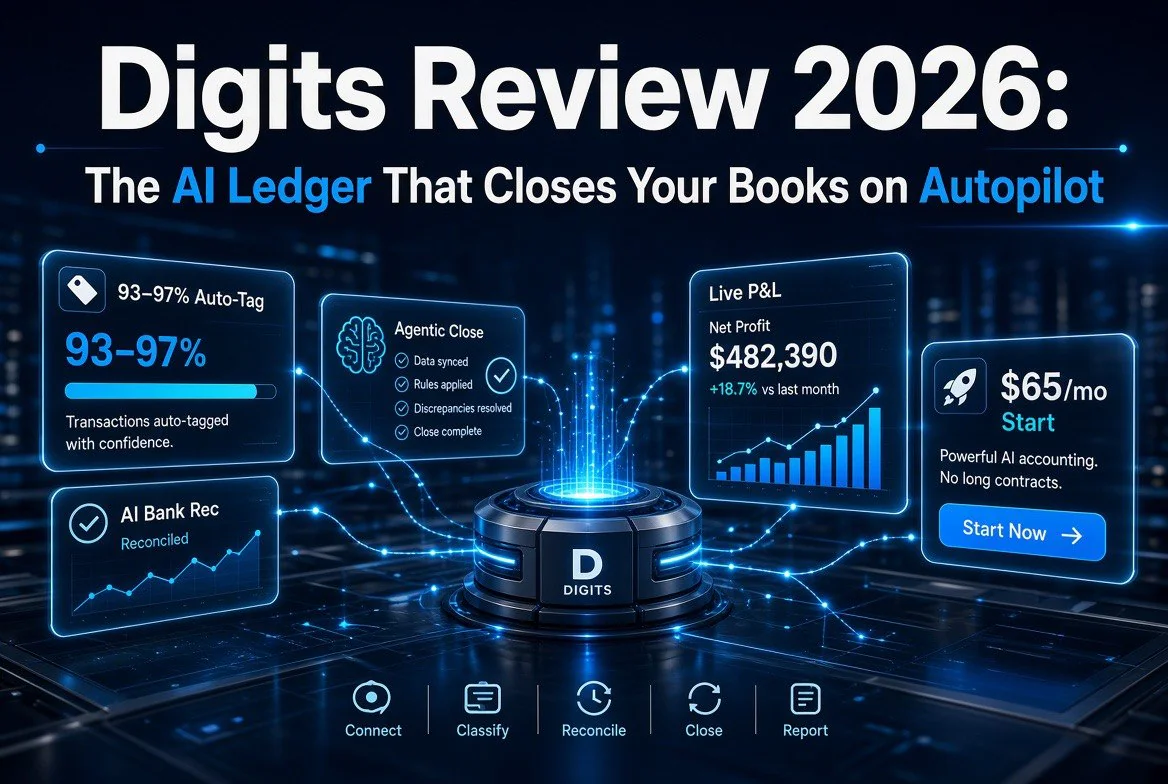
Digits Review 2026: The AI Ledger That Closes Your Books on Autopilot
⚡ Expert Summary: Digits replaces your general ledger with autonomous AI that categorizes your transactions, reconciles your bank feeds, and now closes your books continuously instead of once a month. With auto-categorization accuracy benchmarked at 93–97%, a $65/month starting price, and Agentic Close handling the month-end scramble in the background, it’s the strongest automation-first alternative to QuickBooks for US small businesses that want real-time books without hiring a full-time bookkeeper.
Let’s be honest about the state of small business bookkeeping in 2026. You’re paying a bookkeeper — or spending your own Sunday nights — to do work that is largely repetitive: categorize transactions, match them to the bank statement, book the recurring entries, and produce a P&L nobody looks at until tax season. QuickBooks and Xero added AI features, but they bolted AI onto a ledger built for manual data entry. The software still waits for you to tell it what a transaction is.
Digits builds the opposite way. It’s an AI-native ledger — the categorization, reconciliation, and closing live inside the accounting system and run continuously, 24/7, in the background. You manage by exception. The system does the routine work and only surfaces the anomalies that actually need a human decision. For a US small business owner, that’s the difference between “books are done on the 5th of next month” and “my financials are always current, and I only look at the things the AI flags.”
What Digits Actually Does
Digits is built around what it calls its Autonomous General Ledger (AGL) — a ledger where machine learning models, not manual rules, do the classification. Here’s what that looks like in daily use.
24/7 transaction categorization
As transactions come in from your connected bank, card, and payroll feeds, Digits categorizes each one against a chart of accounts it builds for your specific business. It learns from the transactions you confirm, so the accuracy compounds over time. Digits reports auto-tagging accuracy in the 93–97.8% range in its benchmarks — and instead of trusting low-confidence items blindly, it surfaces those for a quick review rather than hiding them.
AI bank reconciliation
Reconciliation is where most owners lose the week after month-end. Digits continuously matches bank feeds, uploaded statement PDFs, and ledger data in the background. It auto-resolves confirmed matches, and when something doesn’t line up — a duplicate, a missing transaction, a mismatch — it flags it with context and an audit-proof attachment showing exactly where in the PDF the item appears. You’re not scrubbing statements; you’re clearing exceptions.
Automated scheduling
Depreciation, amortization, prepaids, fixed assets, accruals — these are the entries that make “closing the books” take a full day. Digits detects the need from your transactions and drafts the supporting entries automatically, carrying the logic forward month after month so you don’t re-build the same schedules every period.
Real-time financials and dashboards
Because the ledger is always current, your P&L, balance sheet, and cash flow are live — not a snapshot from the last close. You get drag-and-drop dashboards with the KPIs owners actually track: cash, burn, runway, AR aging. No exporting to Excel to figure out where you stand.
agentic Close: The Month-End That Runs Itself
The biggest Digits update this year is Agentic Close, launched in June 2026. Traditional accounting software is built around a month-end event: you scramble for a week to close, then the software sits idle for three weeks until you start again. Digits inverts that model into what it calls a continuous close.
Agentic Close runs the full close workflow all month long, in the background, integrated directly into the ledger:
- Collect — auto-imports from 12,000+ banking and payroll institutions plus documents.
- Book — AI categorization with confidence scoring, learned from your confirmed transactions.
- Reconcile — continuous AI bank reconciliation instead of a month-end event.
- Schedule — auto-generated depreciation, prepaid, and accrual entries.
- Review — quality control surfaces only the exceptions that need a human.
- Report — real-time or scheduled outputs whenever you need them.
You define your accounting standards in plain English — “capitalize purchases over $2,500,” for example — and the system enforces them deterministically. The practical result for a small business: your month-end close stops being a scramble and becomes a background process that’s already mostly done by the time you open the software on the 1st.
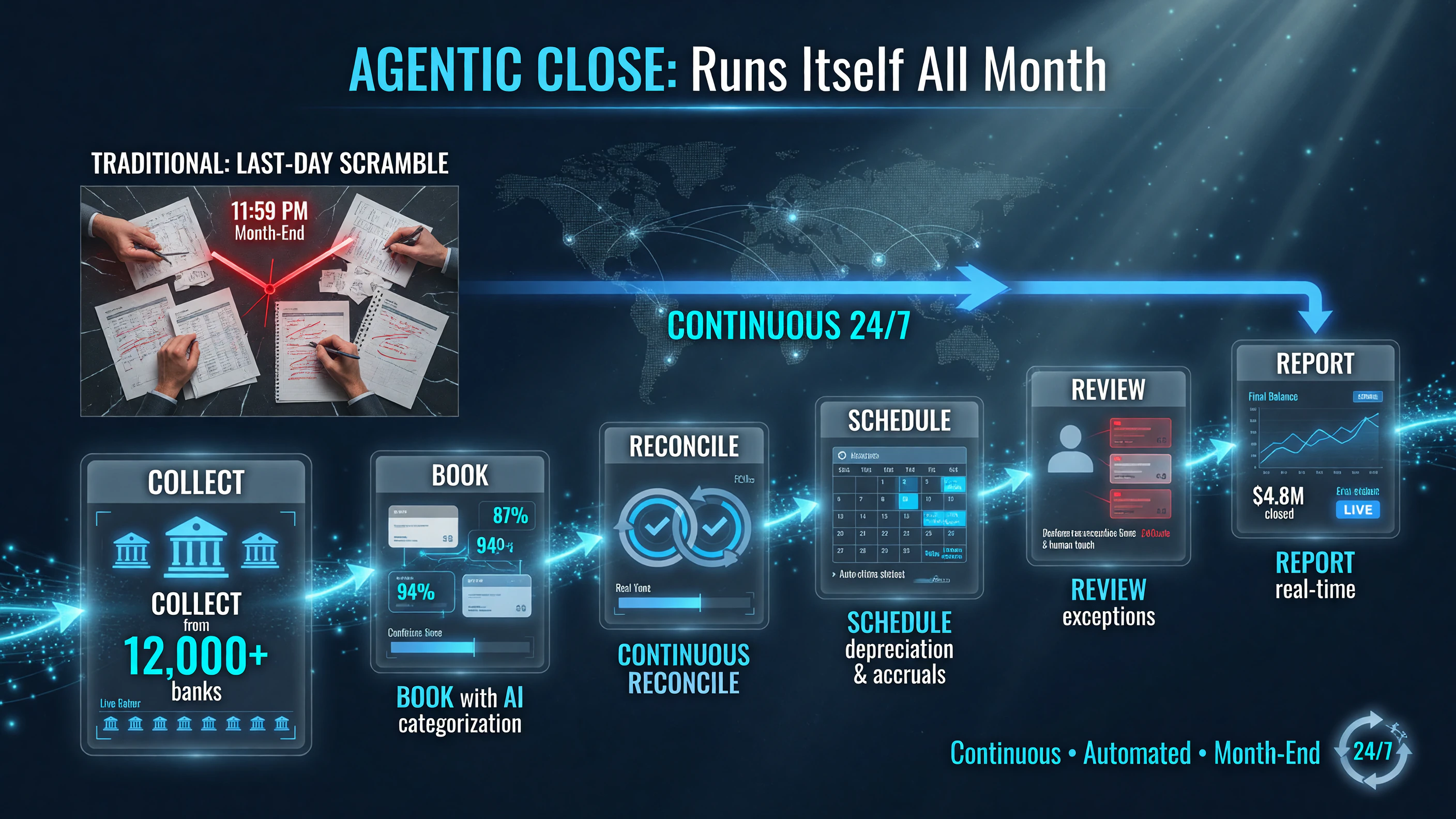
Agentic Close runs the full month-end workflow continuously all month — Collect, Book, Reconcile, Schedule, Review, Report — so the books are already closed before the 1st, instead of a last-day scramble.
Digits vs. QuickBooks vs. Xero vs. a Human Bookkeeper
To make this concrete, here’s how Digits compares against the realistic alternatives for a US small business in 2026.
| Factor | Digits | QuickBooks Online | Human bookkeeper |
|---|---|---|---|
| Categorization approach | AI-native, learns from your confirmations | Rules-based + basic AI assist | Manual, human judgment |
| Reconciliation | Continuous, background, flags exceptions | Manual or scheduled | Manual, monthly |
| Books always current? | Yes — real-time ledger | Only as current as your last input | Only after month-end close |
| Starting price | $65/month (Essentials) | ~$30–40/month entry tiers | $250–800+/month typical |
| Scales by seats? | No — unlimited users included | Per-user fees as you grow | Per hour / scope |
The honest framing: QuickBooks and Xero are cheaper to start and far more familiar to accountants. But if you’re a founder whose real constraint is time — and you’d rather your books be handled autonomously than pay a bookkeeper to re-key transactions — Digits removes the manual layer entirely. That’s the automation-first tradeoff this review is built around.
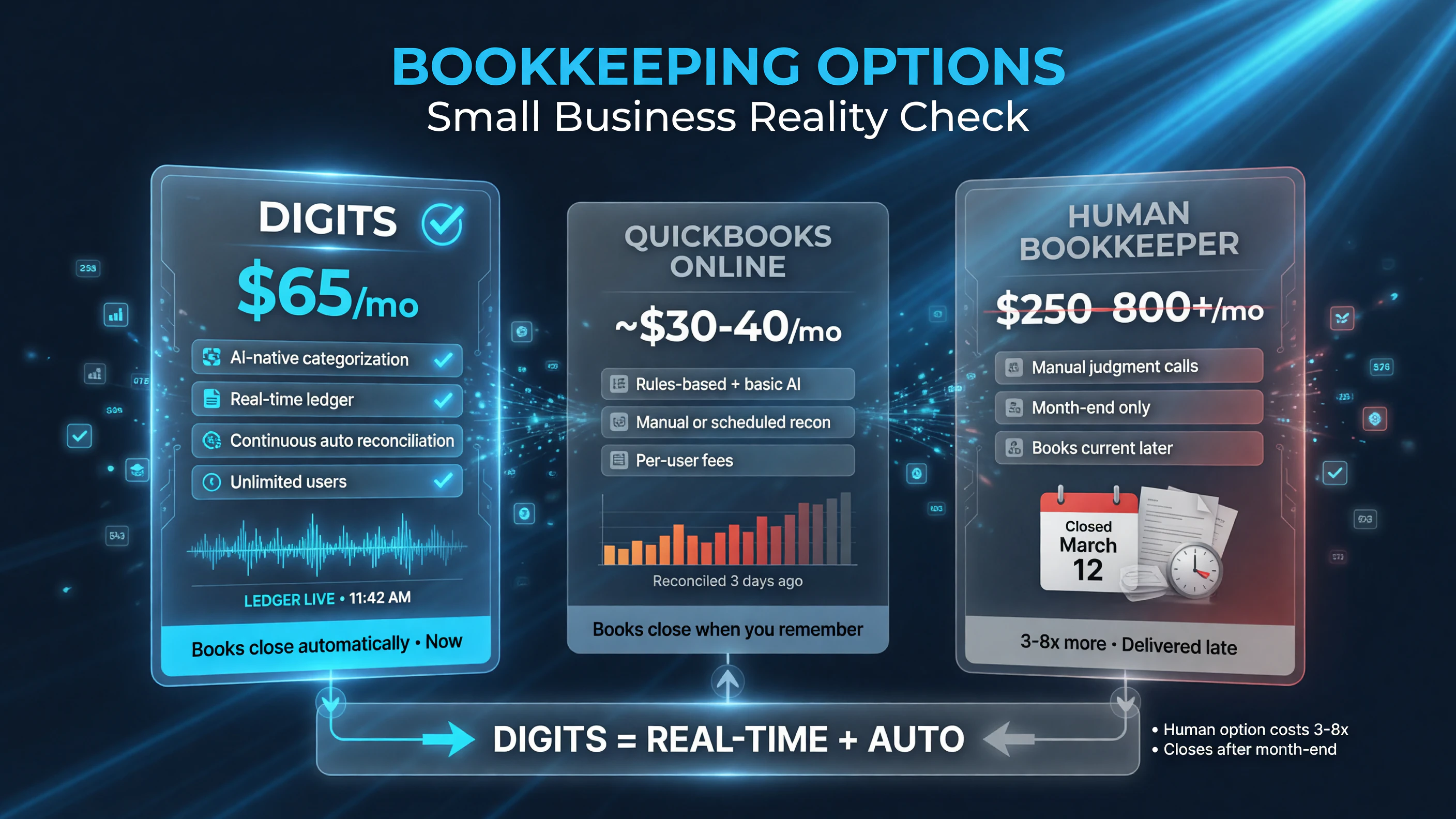
Three realistic bookkeeping paths for a US small business: Digits at $65/mo with a real-time, self-closing ledger beats a $250–800+/mo human bookkeeper that only delivers after month-end.
Who Digits Is Actually For
Digits isn’t for every business. Here’s the honest fit.
Best fit
- Solo operators and lean startups who don’t want a full-time bookkeeper but need books that are always investor-ready and audit-ready.
- Tech-forward owners comfortable with exception-based management — people who’d rather review 10 flagged transactions than enter 400.
- Businesses with complex needs — multi-entity, multi-currency, dimensional accounting by department or project (Pro tier).
- Firms — Digits has a separate partner program with wholesale per-client pricing, so bookkeeping firms can run many clients on the AI ledger.
Not a fit
- Ultra-simple businesses with a handful of transactions a month may not justify $65/month versus a free-forever tier on a legacy tool.
- Businesses that need a human bookkeeper to file or advise — Digits automates the books; it doesn’t replace your CPA for tax strategy.
- Teams married to the QuickBooks ecosystem whose whole process (apps, accountant familiarity) is built around it.
Digits Pricing, Broken Down
Digits prices per business, not per user — which matters as you add employees who need to see the books.
| Plan | Price | What you get |
|---|---|---|
| Essentials | $65/month | Live financials, AI bookkeeping + auto-reconciliation, invoicing & bill pay, Ask Digits, 12,000+ banking integrations |
| Core (most popular) | $100/month | Everything in Essentials + revenue/spend integrations (Stripe, Ramp, BILL), custom dashboards, dimensional accounting, real-time AR/AP aging |
| Pro | $250/month | Everything in Core + Agentic Close with AI error detection, investor-ready management reporting, multi-entity & multi-currency, schedules |
All tiers are per business with unlimited users and come with a free trial. The one-tier-up math matters here: if you run a single-entity business and just want clean books, Essentials at $65 covers it. The jump to Core unlocks the integrations that make the ledger actually autonomous (Stripe/Ramp/BILL), and Pro is where Agentic Close lives — that’s your target if continuous close is the whole point.
How to Set Up Digits for Your Business in 7 Steps
If you’re sold on the concept, here’s the practical setup path so you’re not flying blind on day one. Digits is designed to be running within a few days, but the first month is where the model learns your business — invest there and the automation compounds.
- Start the free trial. Digits offers trials on all plans, so begin on Essentials or jump straight to Core if you already know you want the Stripe/Ramp/BILL integrations. There’s no downside to starting with the tier that matches your complexity.
- Connect your bank, card, and payroll feeds. This is the whole point — Digits pulls transaction data directly from 12,000+ institutions. Prioritize your operating account, corporate card, and payroll provider.
- Connect your revenue and spend tools. If you’re on Core or Pro, hook up Stripe for revenue and Ramp/BILL for spend. These structured feeds are what push auto-categorization accuracy into the high 90s.
- Define your policies in plain English. Tell Digits your accounting standards — spend thresholds, expense categories, capitalization rules. Agentic Close enforces these deterministically once you’re on Pro.
- Review the exception queue daily for the first week. The model is learning your business. Clearing the low-confidence items quickly and correcting any mistakes teaches it faster than letting them pile up.
- Set up your dashboard KPIs. Build the view you actually watch — cash, burn, runway, AR aging. Digits updates these live, so you stop waiting for month-end to know where you stand.
- Invite your accountant. Digits exports clean reports, so loop in your CPA early. Expect some learning curve on their side if they’ve only worked in QuickBooks, but the financials export in standard formats.
The honest expectation to set: the first 30 days have a light learning curve as Digits tunes to your business. By month two, the exception queue shrinks dramatically and you’re mostly reviewing, not entering — which is exactly the point of an AI-native ledger.
Where Digits Falls Short
No tool is perfect, and Digits has real tradeoffs worth naming. The reported auto-tagging accuracy in the high 90s is against its own benchmarks, so treat it as directional — you will still review exceptions, especially in the first month while the model learns your business. Migration from an existing QuickBooks file is possible but isn’t plug-and-play; you’ll want clean historical data. And if your accountant has never worked in an AI-native ledger, expect some learning curve on their side even though the reports export cleanly.
The deeper point: Digits automates the mechanical work of bookkeeping, but it does not replace judgment. You still need a CPA for tax planning and strategy. What Digits does is collapse the hours you spend on data entry and reconciliation so your team — or your accountant — can spend time on the numbers that actually drive decisions.
The Automation ROI Math
Let’s put real numbers behind why this matters. A typical US small business pays a bookkeeper between $250 and $800 a month for work that is largely categorization and reconciliation — the two things Digits automates most directly. Even at the high end of Digits pricing ($250 for Pro, which includes Agentic Close), you’re spending less than the low end of that human range, and you get books that are current every minute rather than current only after month-end.
Add in the time cost. A founder who spends four to six hours a month on bookkeeping review and data entry is losing up to 72 hours a year to work that an AI ledger reduces to clearing a short exception queue. At even $50 an hour of your own time, that’s over $3,500 a year of opportunity cost — more than the entire annual cost of Digits Core.
None of this argues that the software replaces judgment. It argues that you’re currently paying premium money — in fees or in your own hours — for mechanical work that software now handles better, faster, and around the clock. That’s the case for switching, and it’s a math argument, not a feature-list argument.
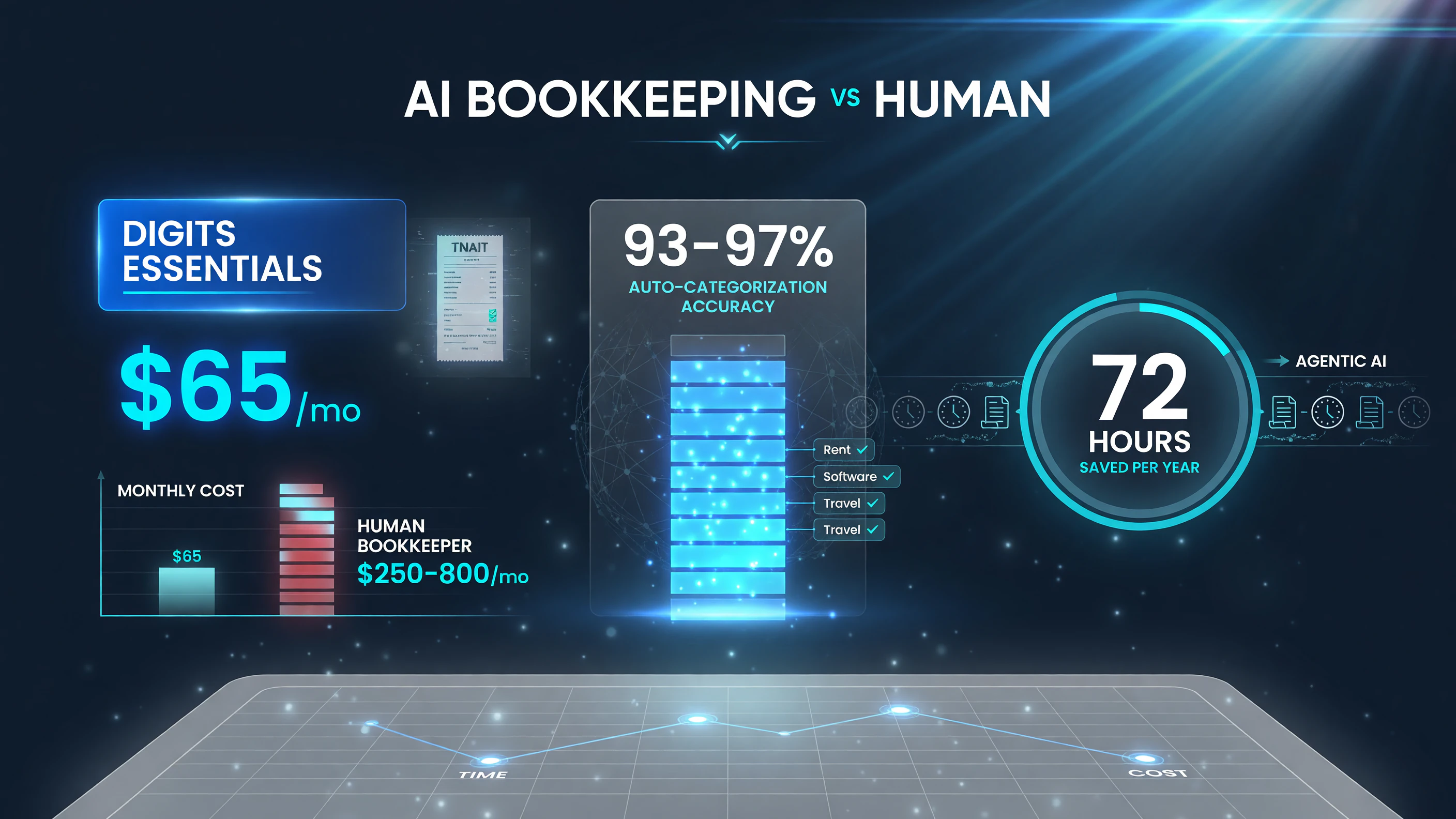
Digits auto-bookkeeping at $65/mo versus $250–800/mo for a human bookkeeper — with 93–97% categorization accuracy, the math is a switching argument, not a feature-list one.
Should You Switch to Digits?
Make the call against these three questions.
- Are you currently paying a bookkeeper mainly to categorize and reconcile? If yes, that’s exactly the work Digits automates — and the $65–100/month subscription is likely a fraction of what you’re paying a human to do the same task.
- Do you need books that are current the moment someone asks for them? If investors, lenders, or partners ever ask for a P&L or cash position on short notice, a continuously-closed ledger is a genuine advantage over a month-old snapshot.
- Are you comfortable managing by exception? Digits is built for owners who’d rather review flagged anomalies than enter transactions. If you still want to touch every transaction yourself, a traditional tool may fit better.
For most US small businesses that outgrew “enter it yourself” but don’t want a full-time bookkeeper, Digits is the strongest automation-first answer in 2026. You get real-time books, a close that runs itself, and an AI ledger that gets smarter about your business every month. That’s the kind of back-office automation that quietly buys back hours — and for a solo operator or lean team, hours are the real currency.
FAQ
What is Digits accounting software?
Digits is an AI-native accounting platform built around an autonomous general ledger. It uses machine learning models to auto-categorize transactions, continuously reconcile bank feeds, and close the books on an ongoing basis rather than only at month-end. Pricing starts at $65/month per business with unlimited users.
How much does Digits cost?
Digits is priced per business, not per user. Essentials is $65/month, Core is $100/month, and Pro is $250/month. All plans include unlimited users and free trials. Accounting firms get separate wholesale per-client pricing through Digits’ partner program.
Is Digits better than QuickBooks for small business?
Digits is automation-first: it categorizes and reconciles continuously with AI, while QuickBooks Online embeds AI into a rules-based tool that still relies on manual input. Digits is a stronger fit if you want autonomous books and manage-by-exception; QuickBooks may be better if you need the lowest entry cost or deep accountant familiarity.
Does Digits replace my bookkeeper or accountant?
Digits replaces the mechanical work a bookkeeper does — categorization, reconciliation, scheduling entries, closing. It does not replace a CPA for tax strategy and planning. Many small businesses use Digits for the books and keep an accountant for the higher-level work.
Does Digits do payroll?
Digits integrates with 12,000+ banking and payroll institutions and auto-categorizes payroll transactions as they arrive. Payroll processing itself is handled through your existing payroll provider; Digits connects to those feeds rather than running payroll in-house.

About Barak Schurr
Barak Schurr built and sold a major ticketing platform, ran global nightlife operations at Eventbrite, and now spends his time figuring out which AI tools actually move the needle for independent business owners — and which ones are just noise. No hype. No fluff. Just what works.
Email: [email protected]
More AI Resources for Your Business