Get The Solo Business OS — Free
The AI workflow that replaces a part-time employee for solo operators and small business owners.
Meta Now Lets AI Agents Set Up WhatsApp Business for You: What US Small Business Owners Should Know
⚡ Expert Summary: On September 15, 2026, Meta launched the WhatsApp Business Tools MCP — a server that connects an AI coding agent like Claude, Cursor, Codex, or ChatGPT directly to the WhatsApp Business Platform, alongside a new AI-focused subscription push. Instead of navigating the Developer Console, Business Manager, API reference, and a code editor, a US business owner can now describe what they need in plain language and let the agent create the business account, verify the phone number, register for Cloud API access, build message templates, and test webhooks. The catch: it’s built for developers and coding agents, not for owners who don’t have one.
If you’ve ever tried to get your business onto WhatsApp Business properly, you know where this is going. You start with good intentions — customers keep messaging your personal phone, and you want to move it to something professional. Then you meet the actual setup: the Meta Developer Console, Business Manager, an API reference written for engineers, and a code editor you didn’t sign up to learn.
Most US small business owners quit somewhere in the middle of that. They keep answering customer texts on a personal number and quietly give up on the “business” part.
On September 15, 2026, Meta moved to fix that — by handing the setup work to AI. Alongside news of its new AI-focused subscription plans, Meta announced the WhatsApp Business Tools MCP, an MCP server that connects an AI agent directly to the WhatsApp Business Platform so the agent can handle the onboarding rather than the owner.
What Is MCP, and Why Should a Business Owner Care?
MCP stands for Model Context Protocol — an open standard that lets an AI model securely connect to an external service and take actions inside it. Think of it as a standard plug: the AI has the intelligence, the MCP server is the socket that lets it actually do things in a real system rather than just talk about them.
It’s not a Meta invention, and that matters. Meta is joining a lane that already includes Stripe, PayPal, GitHub, Notion, Slack, Salesforce, and Atlassian. Meta already had MCP servers for managing ads and monitoring app configuration, so this is an expansion of an existing strategy, not a one-off.
That’s the important context: MCP is becoming the default way AI agents touch real business systems. If you’re evaluating AI tools for your business in 2026, “does it support MCP, and who controls the connection?” is now a legitimate purchasing question.
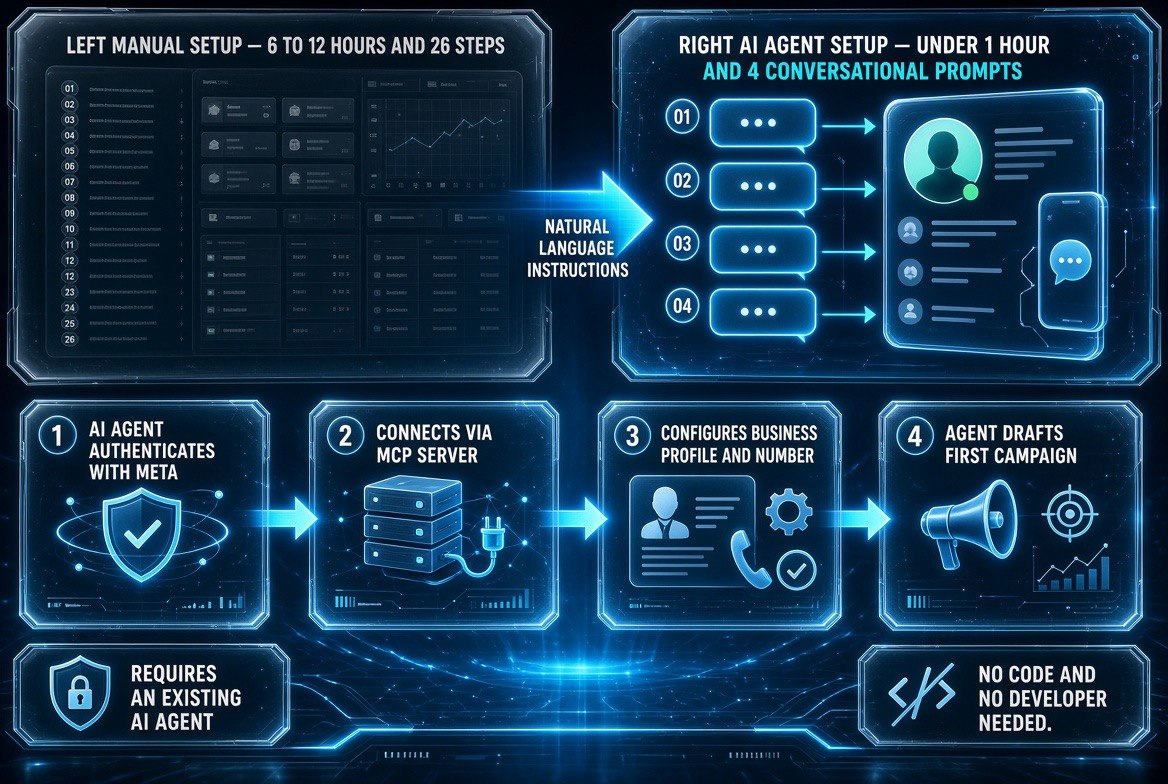
What changes when the agent does the setup: the manual path runs six to twelve hours across twenty-six steps; the agent path runs under an hour across four conversational prompts.
What the Agent Can Actually Do for You
Here’s the practical list Meta published. If you’ve attempted WhatsApp Business setup before, you’ll recognize every one of these as a step where people get stuck:
| Setup Task | Old Way | With an AI Agent |
|---|---|---|
| Create WhatsApp Business account | Manual clicks through Business Manager | Agent creates it from a described instruction |
| Add and verify phone number | Find the right screen, complete verification flow | Agent handles the verification steps |
| Register for Cloud API access | Developer Console + API reference | Agent registers it directly |
| Create or edit message templates | Submit template, wait, revise on rejection | Describe the template — agent writes and edits it |
| Test messages and webhooks | Write test code in an editor | Agent builds and runs the tests |
| Monitor silent failures | You find out when messages stop sending | Agent flags Terms of Service, payment method, and Business Verification issues |
That last row is the one most owners will underrate. Terms of Service acceptance, payment method, and Business Verification are the three things that fail quietly on WhatsApp Business — the account looks fine, then messages stop going out and nobody knows why. Having an agent actively watch those three states is the difference between catching a problem in an hour and discovering it a week into a campaign that never delivered.
Meta notes that a second server, the Meta Social Technologies MCP, can be used alongside it to discover API endpoints, search documentation, and troubleshoot errors during setup and configuration.
The Honest Catch: This Is Built for People Who Already Have an AI Agent
Read the list of supported agents carefully — Claude, Cursor, Codex, ChatGPT — because it tells you who this release is actually for. These are coding agents. Tools that live in a terminal or an editor and are designed for people building software.
So the practical question for a typical US small business owner is not “will this work?” It’s “do I have one of those, and would I know how to point it at an MCP server?”
If you’re a solo operator running a service business, a single-location retailer, or a professional practice, the answer today is probably no. You likely use AI through a chat window or an off-the-shelf app — not through Cursor with an MCP configuration file.
That said, this release is still relevant to you, for one straightforward reason: the direction is now unambiguous. Meta is not building a friendly setup wizard only for owners. It’s building a machine-readable interface for agents. The friendly layer for owners will be built on top of it — by agencies, by tool vendors, and eventually by Meta itself.
| Your Situation | What to Do Right Now |
|---|---|
| You already use Claude, ChatGPT, or Cursor and are comfortable with config files | Set up the WhatsApp Business Tools MCP this week and hands-off the onboarding |
| You use AI tools but only through apps and chat windows | Watch this space — expect owner-facing wrappers within months, not years |
| You have a developer or agency on retainer | Forward this to them — it cuts their WhatsApp setup time to near zero |
| Customers message your personal phone today | Still worth fixing now — professional setup protects the number and your data |
What This Means for Your Customer Messaging Costs
There’s a second-order effect worth understanding, because it’s where the money actually is. WhatsApp Business messaging isn’t free at scale — Meta charges for business-initiated conversations through the Cloud API, and pricing varies by category and country. That’s precisely why template quality and template approval matter so much: a rejected template is a delayed campaign, and a poorly worded template is a conversation that gets blocked or ignored.
Which is exactly the work the agent now takes on. When you can describe a template in plain language and have the agent write it, submit it, revise it after a rejection, and test the webhook that delivers the reply, you compress a loop that used to cost days of back-and-forth into a single conversation. For a US business running seasonal promotions — a spring service push, a holiday booking window, a reactivation campaign to lapsed customers — that compression is the difference between running the campaign on time and running it a week late.
It also changes who can run it. Messaging campaigns have historically required either a developer or an agency on retainer. Every time a template needed a change, you paid someone. An agent that can iterate on templates on request puts that loop back in the owner’s hands — provided you have the agent in the first place, which remains the gate on this release.
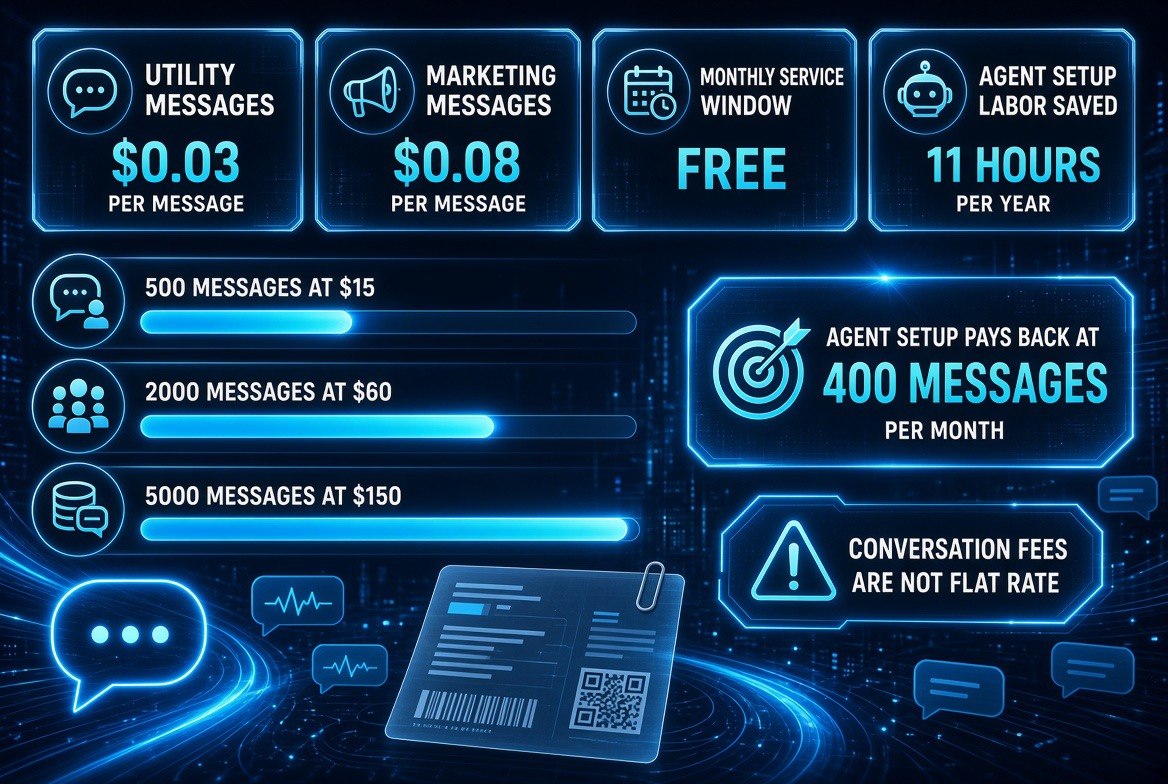
Where the money actually goes: utility messages run about three cents, marketing runs about eight, and the monthly service window is free — so campaign size, not setup, drives your bill.
The Practical Test: Should You Chase This Now or Wait?
Here’s a simple decision rule that doesn’t require you to know what MCP stands for. Ask yourself whether you have a bottleneck that customer messaging would solve, and whether you can already drive an AI agent to do work for you.
- If you have neither — no messaging bottleneck and no agent — the correct move is to do nothing this week. Read this, file it, and revisit when an owner-facing wrapper appears.
- If you have a messaging bottleneck but no agent, fix the first problem the old-fashioned way: get a proper WhatsApp Business account set up through the standard flow or through a developer, and treat this announcement as confirmation that the setup cost is about to collapse.
- If you have an agent already, this is a genuine this-week opportunity. It is free infrastructure access that removes a multi-tool setup process — no reason to leave it on the table.
- If a developer or agency handles your messaging, send this to them today. Their setup time drops meaningfully, and their time is your invoice.
The mistake to avoid is treating a developer-facing release as an owner-facing one and burning a weekend on MCP configuration you don’t need. The second mistake is dismissing it as irrelevant because it’s technical — when the entire strategic point is that Meta is quietly rebuilding how businesses connect to its platform, and owner-friendly tools will follow fast.
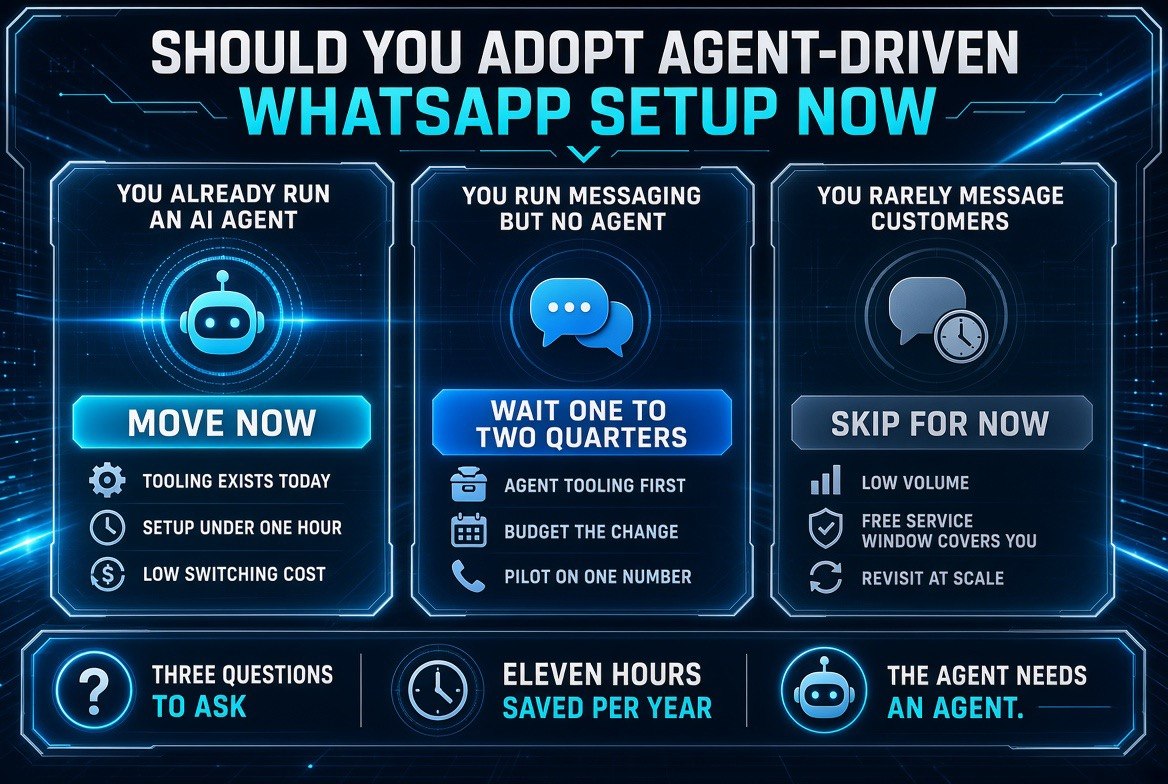
The triage: if you already run an agent, move now. If you message customers but have no agent, wait a quarter or two. If you rarely message, skip it — the free service window covers you.
The Broader Shift: Meta Is Betting on Agents, Not Interfaces
Put this announcement next to the subscription news from the same day and the strategy is legible. Meta is moving toward AI-focused paid plans and simultaneously making its business infrastructure agent-addressable. The company is positioning itself for a world where the thing talking to Meta’s systems is usually not a human clicking a dashboard.
For US small business owners, that’s a meaningful preview of the next two years. The question of which AI tool you buy will matter less than which systems your chosen AI can reach. An AI assistant that can only chat is a novelty. An AI assistant that can register a phone number, submit a template for approval, and catch a failed verification is an employee.
MCP is how that gap gets closed, and today it got closed a little further for WhatsApp.
Frequently Asked Questions
What is the WhatsApp Business Tools MCP?
It’s a Model Context Protocol server Meta launched on September 15, 2026, that connects an AI coding agent — such as Claude, Cursor, Codex, or ChatGPT — directly to the WhatsApp Business Platform. The agent can then handle setup tasks like creating the business account, verifying the phone number, registering Cloud API access, building message templates, and running tests.
Do I need to know how to code to use this?
Effectively yes, today. The supported agents are coding agents that typically run in a terminal or editor and require MCP configuration. If you don’t already use one, this release is not directly actionable for you yet — but it signals where owner-friendly tools are heading.
What setup work can the AI agent actually take off my plate?
Meta lists account creation, phone number addition and verification, Cloud API registration, Terms of Service checks, message template creation and editing, message and webhook testing, and monitoring of silent failures around Terms of Service, payment method, and Business Verification.
Why does Meta care about MCP servers for business tools?
Because it makes Meta’s business infrastructure directly actionable by AI agents rather than only by humans clicking through consoles. Meta already offered MCP servers for ads and app configuration, and this extends the same approach to WhatsApp Business onboarding — consistent with its broader AI subscription push.
Is this useful if I just want to text customers from a business number?
Indirectly. If customers currently message your personal phone, moving to a properly set up WhatsApp Business account still protects your number and separates business data. If you have a developer or agency, this release makes that setup much faster for them. If you don’t, expect owner-facing tools built on top of this MCP relatively soon.
Should I worry about giving an AI agent access to my business account?
Treat it like any other credential decision: use the minimum access the job requires, keep the agent’s actions logged, and confirm you can revoke access quickly. MCP gives an agent real permissions, so the same discipline that applies to any connected tool applies here — twice over.

About Barak Schurr
Barak Schurr built and sold a major ticketing platform, ran global nightlife operations at Eventbrite, and now spends his time figuring out which AI tools actually move the needle for independent business owners — and which ones are just noise. No hype. No fluff. Just what works.
Email: [email protected]
More AI Resources for Your Business