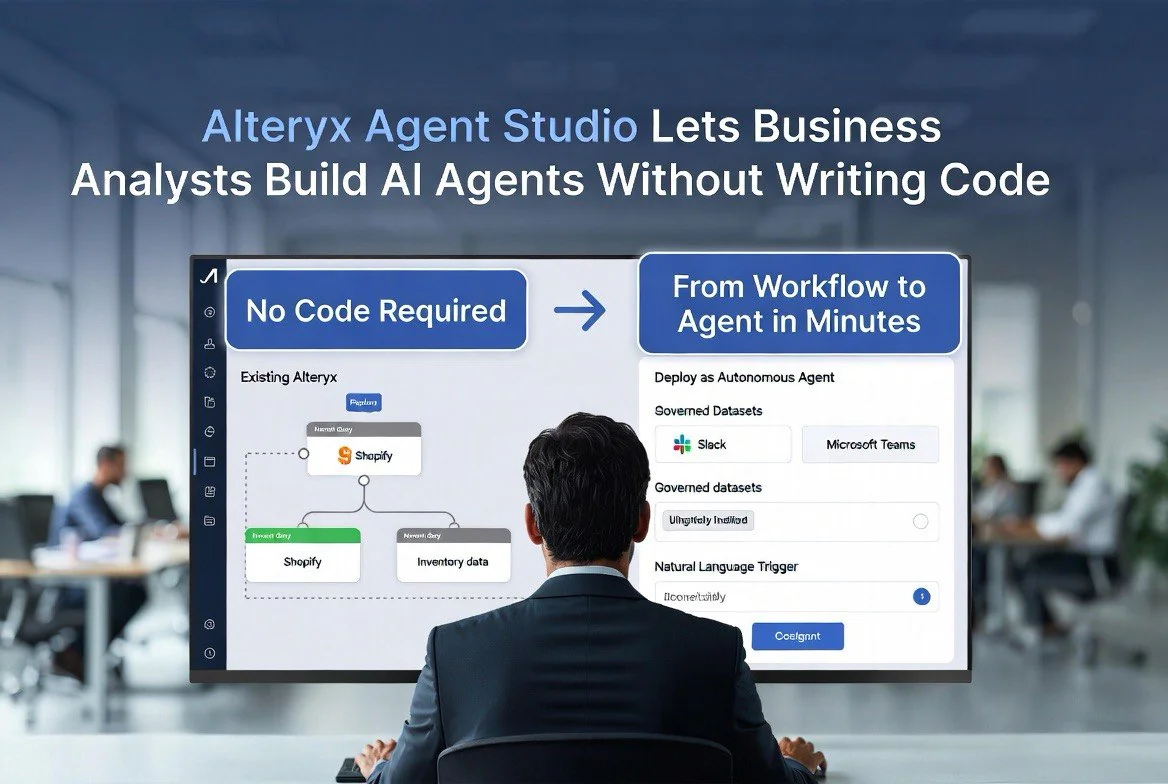
Alteryx Agent Studio Lets Business Analysts Build AI Agents Without Writing Code
⚡ Expert Summary: Alteryx launched Agent Studio at its Inspire 2026 conference, a no-code feature that lets business analysts turn existing data workflows into autonomous AI agents. The agents can be deployed into Slack, Teams, or any major LLM platform (Claude, ChatGPT, Gemini) without developers. A companion MCP Server exposes approved datasets and workflows as callable tools for external AI agents, creating a governed bridge between enterprise data and AI automation. For small business teams without dedicated IT, this means analysts and operations staff can build AI automations directly from the spreadsheets and workflows they already use.
The promise of AI agents for small business has been held back by one thing: someone has to build them.
Most AI agent platforms require Python, API knowledge, or at least comfort with prompt engineering. That excludes the person who actually understands the business process — the operations manager, the financial analyst, the marketing coordinator — and forces them to explain their workflow to a developer who may not understand the business context.
Alteryx Agent Studio, announced at Inspire 2026, closes that gap. It lets business analysts build governed AI agents from their existing Alteryx workflows without writing a single line of code.
How Agent Studio Works
Alteryx is a no-code data analytics platform used by over 8,000 companies worldwide. Its core product lets analysts connect data sources, clean data, build workflows, and generate reports through a visual drag-and-drop interface. It has always been the tool for non-developers who need to work with data.
Agent Studio extends that into the AI era. An analyst opens a workflow they already built — say, a customer churn analysis that pulls data from Salesforce, cleans it in Alteryx, and generates a weekly PDF report — and one-click converts it into an autonomous AI agent.
That agent can then:
- Run the workflow on a scheduled basis without human intervention
- Respond to natural language queries from team members in Slack or Teams: “What was our churn rate last month?”
- Trigger alerts when the data crosses defined thresholds: “Churn rate increased 15% — here is the breakdown by customer segment”
- Expose the workflow as a callable tool for external AI systems via the MCP Server
The critical feature is governance. Every agent only uses approved datasets, vetted workflows, and authorized business logic. An analyst cannot accidentally expose sensitive customer data through a poorly configured agent because the agent only accesses what the original workflow was authorized to use.
A Real Workflow Example — From Start to Finish
To understand what Agent Studio actually does in practice, let us walk through a concrete workflow from conception to deployment.
Meet Sarah. She is the operations manager at a mid-size ecommerce company with 15 employees and roughly $4 million in annual revenue. Every Monday morning, she spends three hours pulling sales data from Shopify, customer data from HubSpot, and inventory data from her warehouse management system into a Google Sheet. She runs a series of pivot tables to identify: which products are trending up, which are trending down, which SKUs are at risk of stockout, and which customer segments are driving the week’s revenue. The result is a Monday morning email to the CEO and the sales team: a snapshot of the week’s performance.
This workflow is information-critical but manually intensive. Sarah spends half her Monday running it, and it is essentially the same analysis every week with different numbers.
With Agent Studio, Sarah first builds the workflow in Alteryx as a visual data pipeline. She connects a Shopify connector (pulling order data for the past seven days), a HubSpot connector (pulling deal stage changes and new contacts), and a warehouse inventory CSV file (exported automatically from her WMS). She uses Alteryx’s drag-and-drop tools to clean the data — removing test orders, standardizing product names across sources, calculating week-over-week growth rates. She adds a filtering step that flags any product with a week-over-week sales increase above 30% (trending up) or below -15% (trending down), and any SKU with fewer than 30 units remaining and a weekly sell rate above 10 units (stockout risk). The final step generates a formatted summary table.
Building the workflow takes Sarah two hours on her first attempt. Once it is working and validated against last week’s actual numbers, she opens Agent Studio and clicks “Create Agent.”
She names it “Weekly Ops Snapshot.” She configures the deployment: the agent lives in her company’s Slack workspace and responds to the command “/weekly-ops”. She sets the schedule: Monday at 9:00 AM, the agent runs automatically and posts the summary to the #operations channel. She configures natural language responses: any team member can DM the agent “Show me stockout risks” or “What was our top-selling product this week?” and the agent runs the relevant part of the workflow and responds.
Total time from zero to deployed agent: approximately two and a half hours — two hours to build the workflow Sarah already understands, thirty minutes to configure the agent. The following Monday, Sarah wakes up to a Slack notification that the ops snapshot is already posted. Her three-hour weekly task is now zero hours.
Comparison with Competing No-Code AI Platforms
Agent Studio enters a competitive landscape. Here is how it stacks up against the main alternatives for small and mid-size businesses:
Microsoft Copilot Studio — $200/month: Microsoft’s agent builder lets you create custom Copilot agents within the Microsoft ecosystem. It is powerful for companies already on Microsoft 365 and Dynamics 365. However, Copilot Studio requires configuring agents through Microsoft’s Power Platform, which has a learning curve steeper than Alteryx’s drag-and-drop. The $200/month per agent (Copilot Studio license) plus the required $22/user/month for Microsoft 365 Business Premium makes it significantly more expensive for a small team. Copilot Studio’s advantage is deep integration with SharePoint, Teams, and Dynamics; its weakness is pricing and the Microsoft-only ecosystem.
Zapier Central — $30-$100/month: Zapier’s AI agent builder (launched late 2025) connects to over 6,000 apps and lets you build trigger-action automations with natural language prompts. It is the lowest-cost option and the easiest to set up for simple workflows. However, Zapier Central struggles with data-heavy workflows that require cleaning, transformation, and multi-step analytics. It is excellent for “when this happens, do that” automations (email triage, form responses, notification alerts) but cannot run complex analytical pipelines the way Alteryx agents can.
Make (formerly Integromat) AI Scenarios — $9-$159/month: Make offers visual scenario builders with AI-enhanced capabilities at competitive pricing. Its data transformation tools are more capable than Zapier’s but less powerful than Alteryx’s. For small businesses doing moderate-complexity data work (CRM syncing, invoicing, basic reporting), Make is a strong value option. For businesses doing heavy analytical processing — multi-source joins, complex calculations, statistical analysis — Alteryx’s analytical engine is significantly more capable.
LangChain/LlamaIndex — Open source but DIY: For businesses with some technical capability, open-source agent frameworks provide maximum flexibility at zero licensing cost. However, they require Python knowledge, API management, and ongoing maintenance. For a small business without dedicated developers, the total cost of ownership (including the time spent by whoever is managing the code) quickly exceeds Alteryx’s subscription.
The right choice depends on workflow complexity and existing tooling. Simple automations → Zapier Central or Make. Microsoft-heavy shops → Copilot Studio. Complex analytical workflows → Alteryx Agent Studio.
Pricing and ROI Breakdown for a Small Business
Alteryx pricing starts at approximately $5,000 per analyst per year for the Creator tier. For a small business, that is a meaningful investment. But the ROI math is straightforward when measured against the hours it saves.
Consider the ecommerce operations manager example above. Sarah saves three hours per week on the ops snapshot workflow. At an implicit hourly value of $40/hour (the blended cost of her salary, benefits, and overhead), that is $120 per week in labor savings, or $6,240 annually — just from one workflow.
If Sarah builds three additional agents (one for weekly inventory planning, one for customer churn monitoring, one for sales commission calculation), the total time savings could reach 10-12 hours per week across the team. At $40/hour, that is $20,800 to $24,960 in annual labor savings — a 4x to 5x return on the $5,000/year Alteryx subscription.
The less obvious ROI comes from decision quality. With automated agents running continuously, the CEO gets the ops snapshot on Monday whether or not Sarah remembered to run it. Stockout alerts fire as soon as inventory crosses thresholds, not when someone notices on a Tuesday morning walkthrough. The business operates on real-time data rather than weekly manual analysis.
For a business that currently spends 10+ hours per week on manual data analysis and reporting, Alteryx at $5,000/year pays for itself in labor savings alone. The improved decision-making speed is a bonus.
When NOT to Use Agent Studio
Agent Studio is powerful but not universal. Here are the situations where it is not the right solution:
- For simple single-step automations. If your workflow is “send an email when a form is submitted” or “copy a file from A to B,” Agent Studio is overkill. A tool like Zapier Central or Make will handle this in a fraction of the time and cost.
- For businesses without an existing Alteryx subscription. Agent Studio requires the base Alteryx platform ($5,000/year). If you are not already using Alteryx for analytics, the total cost of entry is $5,000/year plus the learning curve. Evaluate whether your workflow complexity justifies this investment.
- For workflows that require real-time decision making. Alteryx agents run on a schedule or in response to queries. They are not designed for millisecond-latency responses. If you need a real-time customer-facing agent (instant support chat, live recommendation engine), a purpose-built solution like Google Dialogflow or Intercom’s Fin is more appropriate.
- For teams without a capable analyst. Agent Studio assumes someone on your team can build Alteryx workflows. If no one on staff has data analysis skills, the learning curve for building useful workflows is approximately two weeks of hands-on practice. A tool with natural-language-first setup (Zapier Central) may be more accessible for a team starting from zero data skills.
- For workflows with unstructured data. Alteryx is optimized for structured data (spreadsheets, databases, APIs with consistent fields). If your workflow involves processing PDFs, freeform text, images, or audio, Agent Studio’s analytical pipeline is less capable than purpose-built document processing tools.
- For high-volume external-facing automation. Alteryx agents are designed for internal team use — Slack, Teams, internal LLM platforms. They are not built for high-scale customer-facing web APIs. If you need to expose your data workflows as public-facing APIs, consider a purpose-built API management platform.
The MCP Server Connects Everything
The companion Alteryx One MCP Server, based on the Model Context Protocol (MCP), exposes Alteryx workflows as tools that external AI agents can call. An agent running on Claude or ChatGPT can query your Alteryx datasets, run your existing workflows, and incorporate the results into its own reasoning.
The MCP Server works bidirectionally in practice. An AI agent can request data from Alteryx, and the result flows back through the agent’s context. Alternatively, the AI agent can generate a plan that executes inside Alteryx, with the analyst reviewing and approving before the workflow runs.
This matters for small businesses because it decouples AI agent development from technical skill requirements. Your marketing manager can build a customer segmentation agent in Agent Studio using the same workflow they already use for email campaigns. The agent operates in Slack, serving your whole team. No developer needed.
Future Roadmap and What’s Coming
Alteryx has shared its roadmap for Agent Studio through early 2027, and the planned additions suggest the platform is moving toward becoming a full agent orchestration layer rather than a simple workflow converter.
Q3 2026 – Multi-agent orchestration: Currently, each Agent Studio conversion creates one autonomous agent running one workflow. The Q3 update will introduce agent linking — Agent A’s output triggers Agent B, which triggers Agent C, creating a chain of analysis. A daily sales agent triggers a stockout risk agent, which triggers a purchase order agent, creating a fully automated supply chain in minutes rather than hours.
Q4 2026 – Human-in-the-loop workflows: Not every decision should be automated. The Q4 release will add approval gates — configurable points where the agent pauses and sends a Slack message: “Recommended order of 200 units of SKU-4231 for $3,420. Approve? [Yes/No/Modify].” This governance layer is crucial for financial workflows and customer-facing decisions.
Q1 2027 – Natural-language workflow builder: Currently, analysts build workflows through Alteryx’s visual drag-and-drop interface and then convert to agents. The Q1 2027 release plans to let analysts describe workflows in natural language — “Analyze weekly sales, flag stockout risks, and post to Slack” — with Alteryx AI generating the underlying workflow automatically. This would further lower the barrier for non-technical users.
Early 2027 – Cross-platform agent deployment: The current deployment targets (Slack, Teams, LLM platforms) will expand to include email, SMS, web widgets, and custom webhooks. This would let agents push alerts via email to external stakeholders (suppliers, partners) without those recipients needing access to your Slack workspace.
H2 2027 – Agent marketplace: Alteryx plans to launch a marketplace where approved workflows can be shared, sold, or licensed. A restaurant analytics specialist could build a labor forecasting agent and sell it to other Alteryx users via the marketplace. This would dramatically expand the available workflow library beyond what any single business builds in-house.
Who This Is For
Alteryx pricing starts at roughly $5,000 per analyst per year for the Creator tier — not a tool for the solopreneur budget. However, the bar for “business analyst capable of using this” is low. Anyone comfortable with Excel pivot tables and basic data cleanup can build Alteryx workflows.
The ideal use case for a small business is a team of 5-20 people where one or two staff members handle operations, reporting, and data analysis. That person builds the workflows and converts them to agents. The rest of the team interacts with the agents in Slack or Teams without ever opening Alteryx.
The MCP Server is the hidden unlock. It means your Alteryx agents can feed directly into a broader AI assistant that your team uses. A single agent handles customer data, another handles inventory, another handles financial reporting. They all serve one chat interface that answers any business question.
When to Consider This
Agent Studio was in preview at Inspire 2026 (May) with general availability rolling out through mid-2026. If you already use Alteryx, the Agent Studio feature is a free addition to your existing subscription — there is no separate licensing cost for converting workflows to agents.
If you do not use Alteryx but have recurring data workflows that someone on your team manages manually, the ROI calculation is straightforward. A workflow that takes your operations person two hours every Monday to run and format can become a self-service agent that handles it in seconds.
For US-based small businesses, the training curve is the main consideration. An existing staff member needs roughly two weeks of hands-on practice to build workflows confidently. After that, converting workflows to agents is a matter of clicking “Create Agent” and configuring how the team will interact with it.
Key takeaways:
- Alteryx Agent Studio converts existing no-code data workflows into autonomous AI agents without writing code
- Agents deploy to Slack, Teams, or any LLM platform — team members ask questions in natural language
- The MCP Server exposes approved workflows as tools for external AI agents (Claude, ChatGPT, Gemini)
- Governance ensures agents only use vetted datasets and authorized business logic — no accidental data exposure
Frequently Asked Questions
What is Alteryx Agent Studio?
Agent Studio is a no-code feature that converts existing Alteryx data workflows into autonomous AI agents. It was announced at the Inspire 2026 conference and is available as part of Alteryx One.
Do I need coding skills to build Alteryx agents?
No. Agent Studio uses visual drag-and-drop interfaces consistent with Alteryx’s existing no-code platform. Anyone who can build an Alteryx workflow can convert it to an agent.
What platforms can Alteryx agents be deployed to?
Agents can be deployed into Slack, Microsoft Teams, or any major LLM platform including Claude, ChatGPT, and Gemini through the MCP Server.
How much does Alteryx Agent Studio cost?
Agent Studio is included with existing Alteryx One subscriptions at no additional cost. Alteryx Creator tier pricing starts at approximately $5,000 per analyst per year.
Can Alteryx agents access my existing business data?
Yes. Agents connect to the same data sources your workflows already use — Salesforce, databases, spreadsheets, cloud storage — but only within the permissions of the original workflow.

About Barak Schurr
Barak Schurr is the founder and former president of the nightlife ticketing platform Wantickets and former Global Director of Dance and Nightlife at Eventbrite. He currently focuses on AI research and writes about practical AI for independent business owners that actually moves the needle — no hype, no corporate fluff. More at topnotchaitools.com. Contact: [email protected]
More AI Resources for Your Business