Get The Solo Business OS — Free
The AI workflow that replaces a part-time employee for solo operators and small business owners.
How to Automate Small Business Bookkeeping With AI in 2026
⚡ Expert Summary: AI bookkeeping in 2026 can automate 70-90% of routine work — transaction categorization, receipt capture, bank reconciliation, and anomaly detection — and cut your bookkeeping cost by roughly 40-50%. QuickBooks Online and Xero are the two platforms that put this natively inside the software you likely already use, and both reach 95-98% first-pass accuracy on categorization once trained on your history. This guide walks you through a 7-step plan to turn that on, starting with what you already have.
Every small business owner eventually hits the same wall: the piles of receipts, the un-categorized transactions at month-end, the bank statement that never quite matches, the bookkeeper invoice that feels too big for what looks like too little. Bookkeeping is the work you can’t skip but desperately want to automate — and in 2026, you finally can.
AI bookkeeping isn’t a futuristic promise anymore. QuickBooks and Xero both ship AI that reads receipts, categorizes transactions against your history, matches bank records, and flags anomalies — doing the repetitive data-entry work that used to eat a full day each week. The catch is that most owners never turn it on, or turn it on and never train it, so it stays useless. This guide fixes that with a practical, step-by-step plan to automate your small business bookkeeping with AI, starting today.
Why Automating Bookkeeping Matters
Here’s the cost of doing nothing. A typical US small business doing under $1 million in revenue spends several hours a week on manual bookkeeping — categorizing transactions, snapping and filing receipts, matching the bank feed to the ledger, chasing down anomalies. That time is real money: at even modest rates, manual bookkeeping can run $300-$600 a month with a bookkeeper, or a meaningful chunk of your own week if you DIY it.
AI changes the economics. Automated bookkeeping tools routinely cut total bookkeeping cost by 40-50% — turning that $300-$600 monthly bill into roughly $150-$300 — while eliminating the error-prone busywork. Industry benchmarks show AI reaches 95-98% accuracy on transaction categorization after training on your history, and 92-96% on bank reconciliation matching. It doesn’t replace judgment; it removes the drudgery so you (and your accountant) spend time on the 2-10% of exceptions that actually matter.
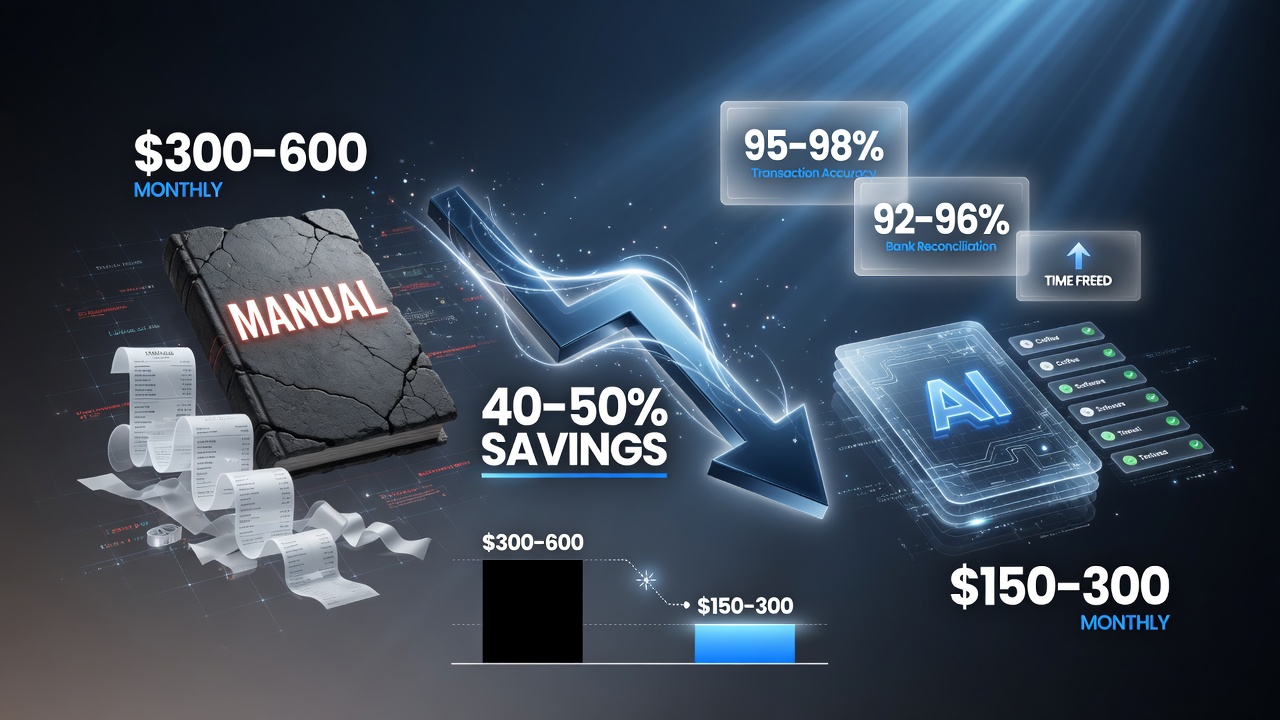
The economics that make AI bookkeeping worth it: manual bookkeeping runs about $300 to $600 a month, and automation cuts that to roughly $150 to $300 — a 40-50% reduction — while AI sustains 95-98% transaction accuracy and 92-96% bank reconciliation.
How AI Bookkeeping Actually Works
Before the steps, understand the four things modern AI bookkeeping tools do, because each maps to a step in the guide:
- Smart document capture (OCR): snap a receipt or forward an invoice, and AI extracts the date, vendor, amount, and category automatically.
- Transaction categorization: AI labels each bank transaction against your chart of accounts, learning your patterns the more you use it.
- Auto bank reconciliation: AI matches bank-feed transactions to your ledger items in real time, flagging only the exceptions.
- Anomaly & duplicate detection: AI catches double charges, unusual amounts, and likely mis-categorizations before month-end close.
QuickBooks (via Intuit Assist and its AI agents) and Xero (via JAX and auto bank reconciliation) both do all four natively. The rest of this guide shows you how to set them up correctly.
What You’ll Need
| Component | What You Need | Approx. Cost |
|---|---|---|
| Accounting platform | QuickBooks Online or Xero with AI features enabled | ~$25-$115/month |
| Bank / card feeds | Connect your business bank and cards for auto-sync | Free (included) |
| Receipt capture app | Mobile apps to snap receipts (built into both platforms) | Free (included) |
| Chart of accounts | A clean, current list of your expense categories | Free (you likely have it) |
| 30-60 days of patience | Time for the AI to learn your patterns and reach full accuracy | Your time, one-time |
That’s the whole list, and here’s the good news: most of it you already have. If you run QuickBooks or Xero, you already own the platform and the receipt app. The real work is configuration and training — which is exactly what the steps below handle.
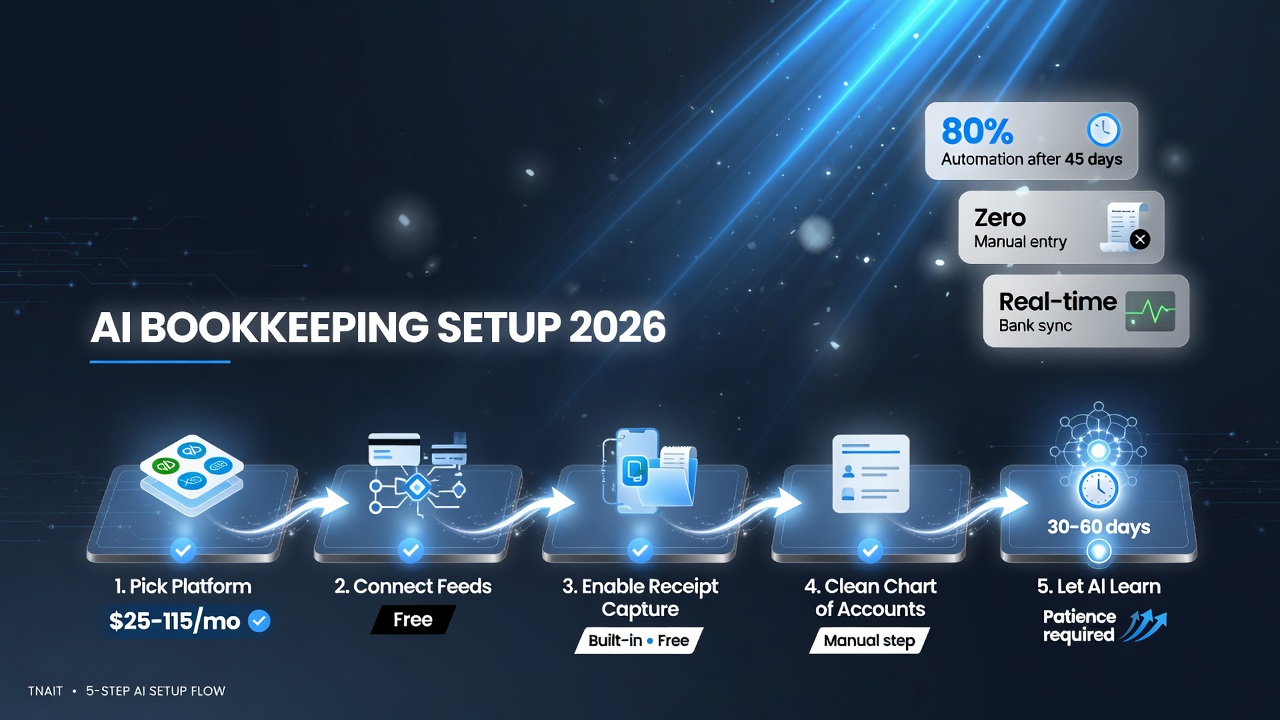
You only need five things to get started: an AI-enabled accounting platform (about $25-115 a month), connected bank and card feeds (free), built-in receipt capture (free), a clean chart of accounts, and 30-60 days of patience while the AI learns your patterns.
Step-by-Step: Automate Bookkeeping With AI
Step 1: Clean Up Your Chart of Accounts
AI categorization learns from your chart of accounts and history. Before you let it loose, delete duplicate categories, merge the ones you never use, and add a sensible set you’ll actually stick to. A clean chart is the single biggest accuracy lever — the AI can only categorize into buckets that exist.
Step 2: Connect Your Bank and Card Feeds
Turn on bank feeds for every business account in QuickBooks or Xero. This is the fuel for auto-categorization and reconciliation. Set a recurring nightly sync so the ledger is always current and the AI has fresh data to learn from.
Step 3: Turn On and Train the AI Categorization
Enable the AI (Intuit Assist in QuickBooks, JAX and AI categorization in Xero) and let it start suggesting categories for your historical transactions. Correct the mistakes it makes for the first few weeks — every correction trains the model to your patterns. Within 30-60 days it typically reaches 95-98% first-pass accuracy.
Step 4: Set Up Receipt and Document Capture
Install the mobile app and get the whole team in the habit of snapping receipts at the point of sale. AI extracts the date, vendor, amount, and category automatically, so paper never piles up and nothing hits the ledger as “uncategorized.” This alone eliminates hours of month-end data entry.
Step 5: Enable Auto Bank Reconciliation
Turn on auto-matching so AI pairs your bank-feed transactions with ledger items in real time. It flags only the 2-10% of exceptions for your review. Xero’s auto-match reportedly handles a large share of transactions automatically and saves roughly half the monthly reconciliation time; QuickBooks’ matching is similarly fast.
Step 6: Turn On Anomaly and Duplicate Detection
Enable the alerts that catch double charges, unusual amounts, and likely mis-categorizations. This is your error net — it catches problems before month-end close instead of after, which is where most bookkeeping errors hide.
Step 7: Set a Weekly Review Routine and Involve Your Accountant
Book 15-20 minutes weekly to approve the AI’s categorized transactions and review flagged exceptions. Hand your accountant read-only access (or a clean export) so they audit the 2-10% edge cases AI can’t judge. This hybrid model — AI for volume, human for judgment — is exactly how the best-run small businesses run books now.
Ready-to-Use Checklist
Print this and work through it in order:
- Confirm your platform (QuickBooks or Xero) has AI features enabled
- Clean up your chart of accounts (remove duplicates, merge unused)
- Connect all business bank and card feeds
- Set a nightly auto-sync for bank feeds
- Turn on AI categorization (Intuit Assist / JAX)
- Install the receipt capture mobile app
- Train the team to snap receipts at point of sale
- Enable auto bank reconciliation
- Turn on anomaly and duplicate detection
- Correct AI categorization mistakes weekly for 30-60 days
- Set a 15-20 min weekly review routine
- Give your accountant read-only access / clean export
Choosing Your AI Bookkeeping Setup
| Capability | QuickBooks Online | Xero | Add-on (Booke AI) |
|---|---|---|---|
| AI categorization | Yes (Intuit Assist) | Yes (JAX) | Yes (in-platform) |
| Receipt OCR | Yes | Yes | Yes |
| Auto bank reconciliation | Yes | Strong (high auto-match) | Yes |
| Anomaly detection | Yes | Yes | Yes |
| Entry price | ~$38/mo+ | ~$25/mo+ | ~$50/mo (add-on) |
| Best fit | US businesses, deep payroll/tax | Multi-currency, high reconcile volume | Deeper automation inside either |
The right answer starts with what you already run. If you’re on QuickBooks, use its native AI; if you’re on Xero, use JAX. Add Booke AI (or Dext, or Docyt) only if you want deeper automation on top — receipts, categorization, and reconciliation with GPT-level reasoning — for roughly $50/month per business. For most small businesses under $1-million in revenue, the native tools are enough to hit the 40-50% cost reduction.
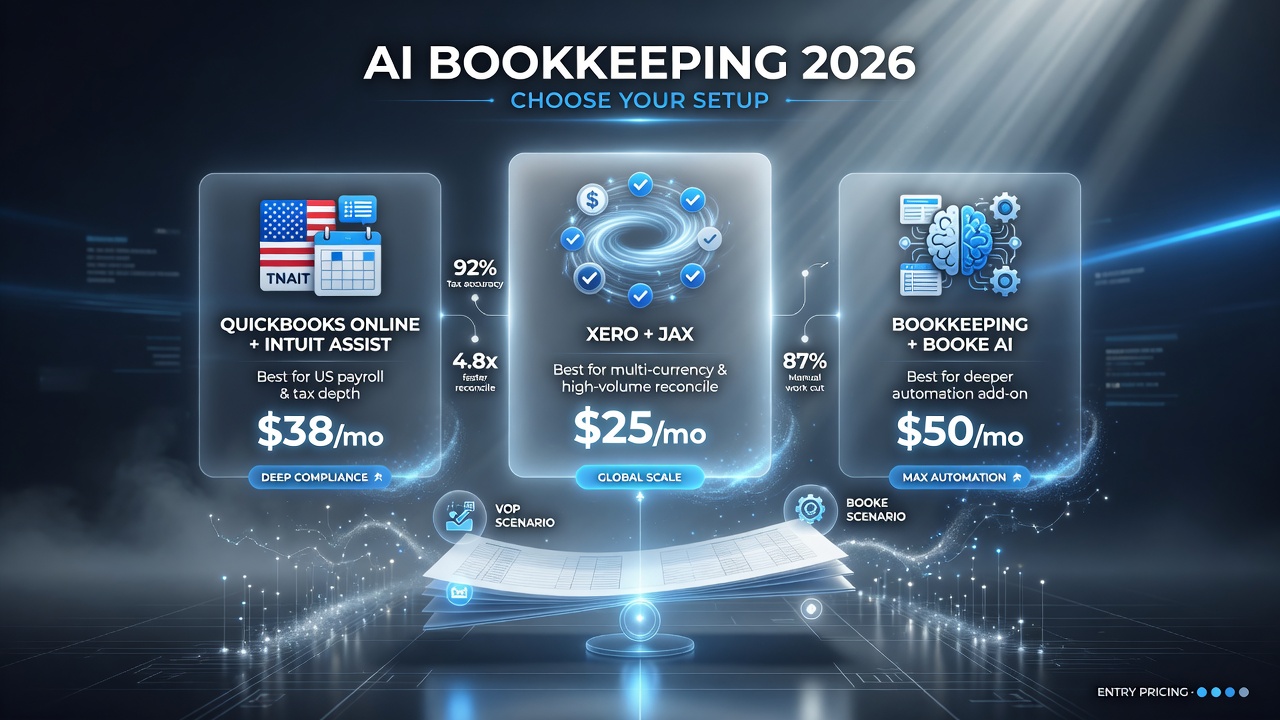
Pick the setup that matches how you run the business: QuickBooks Online (Intuit Assist) suits US businesses that need deep payroll and tax, Xero (JAX) handles multi-currency and high reconcile volume, and a Booke AI add-on layers deeper automation on either at roughly $50 a month.
Common Mistakes to Avoid
- Skipping the chart-of-accounts cleanup. AI can only categorize into buckets that exist. A messy chart guarantees messy output.
- Not training it. First-pass accuracy is 95-98% only after 30-60 days of corrections. Skip the weekly corrections and it stays mediocre forever.
- Letting AI run unsupervised. The 2-10% of exceptions still need human judgment. Weekly review is non-negotiable.
- Ignoring bank feed disconnects. If a feed goes stale, AI has no data to learn from. Check syncs weekly.
- Expecting full autonomy. AI bookkeeping is a force multiplier, not a replacement for your accountant. The hybrid (AI + periodic human review) is the winning model in 2026.
Frequently Asked Questions
Can AI really automate my business bookkeeping?
Yes, to a large degree. Modern AI bookkeeping tools automate 70-90% of routine tasks — transaction categorization, receipt capture, bank reconciliation, and anomaly detection — while flagging the exceptions that need human judgment. QuickBooks and Xero both do this natively.
How accurate is AI bookkeeping?
After a training period of 30-60 days, AI categorization typically reaches 95-98% first-pass accuracy, and bank reconciliation matching hits 92-96%. AI-assisted error rates drop to roughly 0.1-0.5%, far below the 1-8% common in manual entry.
How much money can AI bookkeeping save?
Automated bookkeeping typically cuts total cost by 40-50% — for example, from $300-$600/month for manual bookkeeping down to about $150-$300/month — while also reducing errors and speeding up month-end close by 30-57%.
Will AI bookkeeping replace my bookkeeper or accountant?
Not fully. AI handles high-volume, repetitive work, but the 2-10% of complex or judgment-heavy exceptions still need human review. The best setup in 2026 is hybrid: AI for the volume, your accountant for the edge cases and strategy.
How long does it take to set up AI bookkeeping?
You can connect feeds and turn on AI in an afternoon, but it takes 30-60 days of weekly corrections for categorization to reach full accuracy. It’s a short setup followed by a training curve that pays off steadily.
QuickBooks or Xero — which is better for AI bookkeeping?
Both are excellent. QuickBooks (Intuit Assist) is often the better fit for US businesses needing deep payroll and sales-tax integration; Xero (JAX) excels at bank reconciliation and multi-currency use, often at a lower entry price. Choose based on which you already run and your compliance needs.

About Barak Schurr
Barak Schurr is the founder and former president of the nightlife ticketing platform Wantickets and former Global Director of Dance and Nightlife at Eventbrite. He focuses on AI research and writes about practical AI for independent business owners — no hype, More at topnotchaitools.com.
Contact him at [email protected]
More Resources for Small Business Owners